
Callbacks and TensorBoard
model.fit is a loop you cannot see inside. Callbacks are the hooks that let you
watch it, stop it, save from it and change it mid-flight — and every one of the
training policies in this phase was built from them. This page measures four of
those policies on the same model, and along the way pins down what the loss number
Keras prints during an epoch actually is.
What you’ll learn
Section titled “What you’ll learn”- The callback lifecycle, and which hook fires where.
- What
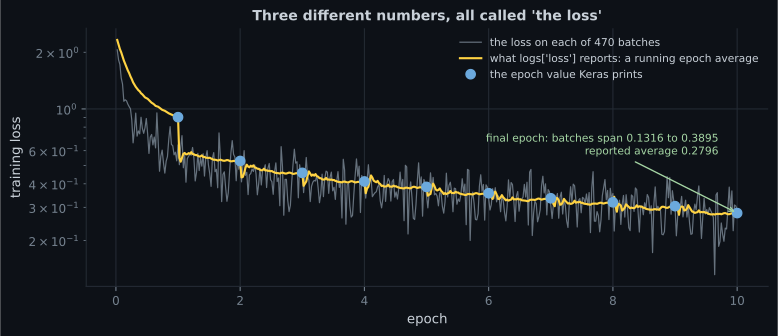
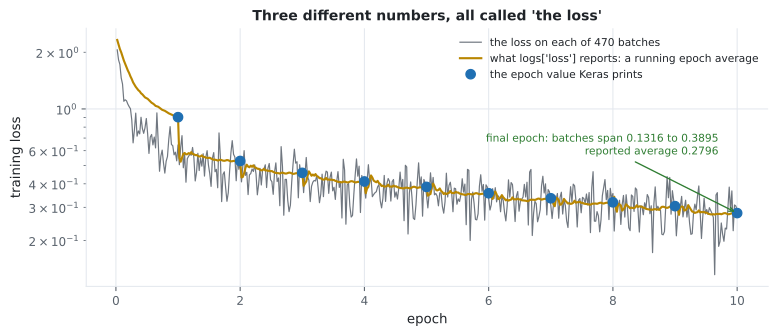
logs["loss"]means insideon_train_batch_end: a running epoch average, not the batch’s loss — measured at 1.1317 mid-epoch against a batch range of 0.4560 to 2.0592. - Four policies on identical models: 0.8540, 0.8447, 0.8447, 0.8613 test accuracy.
- Why
EarlyStopping(restore_best_weights=True)andModelCheckpoint(save_best_only=True)gave identical results, and when to prefer each. - The honest catch: early stopping on
val_losscost 0.0093 accuracy while improving the loss by 0.2394. - What checkpointing costs: 26,060,320 bytes saving every epoch against 3,257,540 for best-only.
The lifecycle
Section titled “The lifecycle”flowchart TD A["on_train_begin"] --> B["on_epoch_begin"] B --> C["on_train_batch_begin"] C --> D["one gradient step"] D --> E["on_train_batch_end
logs = running averages"] E --> C E --> F["on_epoch_end
logs = epoch + validation metrics"] F --> B F --> G["self.model.stop_training = True
ends the run"] F --> H["on_train_end"]
Every hook receives a logs dict and can read self.model. Two facts do the heavy
lifting: validation metrics only exist in on_epoch_end, and setting
self.model.stop_training = True anywhere ends the run cleanly.
class StopAt(keras.callbacks.Callback):
    def __init__(self, target):
        super().__init__()
        self.target = target
        self.stopped_epoch = None

    def on_epoch_end(self, epoch, logs=None):
        if logs["val_accuracy"] >= self.target:
            self.stopped_epoch = epoch + 1
            self.model.stop_training = True
Measured with a target of 0.8600 over a 40-epoch budget: it fired at epoch 36
with a validation accuracy of 0.8620, and fit returned a history containing 36
entries rather than 40.
The loss Keras prints is not the loss on the batch
Section titled “The loss Keras prints is not the loss on the batch”This trips up anyone who writes their first monitoring callback. Inside
on_train_batch_end, logs["loss"] is the cumulative average over the epoch so
far — which is why the progress bar’s number falls so smoothly. Record both and
the difference is stark:
| Epoch | Printed | Batch min | Batch max | Batch sd | Running average mid-epoch |
|---|---|---|---|---|---|
| 1 | 0.9039 | 0.4560 | 2.0592 | 0.3501 | 1.1317 |
| 2 | 0.5289 | 0.3218 | 0.7452 | 0.0943 | 0.5502 |
| 5 | 0.3851 | 0.2165 | 0.5168 | 0.0678 | 0.3882 |
| 10 | 0.2796 | 0.1316 | 0.3895 | 0.0546 | 0.2811 |
Two consequences. In epoch 1 the individual batches spanned 0.4560 to 2.0592 while the printed figure was 0.9039 — an average over a window in which the model changed enormously, so it describes no particular state of the model. And even at epoch 10 the batch standard deviation is 0.0546, which is larger than most of the differences this phase has been comparing.
If you want per-batch losses, compute them yourself (evaluate the batch after the step, as the grey line above does). If you want a smooth signal, the running average is already there.
Four policies, one model
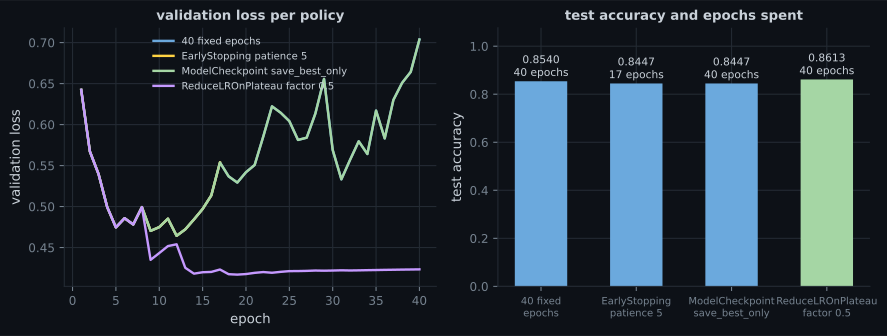
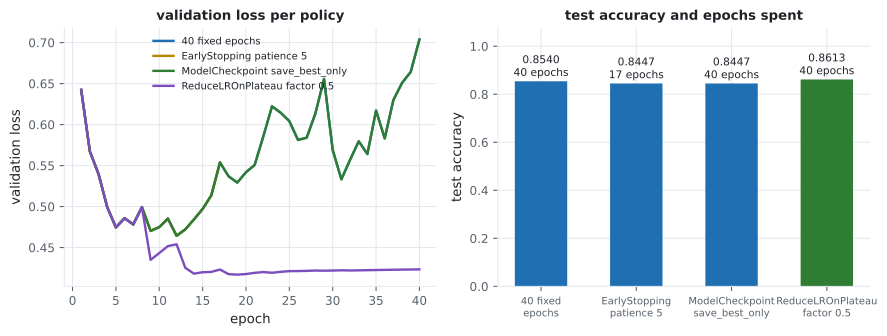
Section titled “Four policies, one model”Every policy below is the same architecture, seed and data — only the callback list changes. 6,000 Fashion-MNIST rows, 40 epochs maximum, Adam at 1e-3:
| Policy | Epochs run | Test accuracy | Test loss |
|---|---|---|---|
| 40 fixed epochs | 40 | 0.8540 | 0.7037 |
EarlyStopping(patience=5, restore_best_weights=True) | 17 | 0.8447 | 0.4643 |
ModelCheckpoint(save_best_only=True), reloaded | 40 | 0.8447 | 0.4643 |
ReduceLROnPlateau(factor=0.5, patience=3) | 40 | 0.8613 | 0.4234 |
Three readings, and the second is the uncomfortable one:
- Early stopping and best-checkpointing are the same policy. Identical accuracy and identical loss to four decimal places, because both end up holding the weights from the same epoch. The difference is operational: early stopping saves 23 epochs of compute, while checkpointing survives a crashed process because the weights are on disk.
- Stopping early cost accuracy. 0.8447 against the fixed run’s 0.8540 — early
stopping gave back 0.0093 of accuracy while improving the loss by 0.2394. Both
are true because
val_lossandval_accuracydisagree about when to stop, the same divergence measured on the IMDB page. Monitor the metric you actually care about, and if that is accuracy, say so:monitor="val_accuracy", mode="max". - Reducing the rate beat stopping. 0.8613 and 0.4234, best on both columns, by continuing to train at a lower rate instead of giving up — consistent with the 60-epoch plateau run on the scheduling page.
fixed = []

early = [keras.callbacks.EarlyStopping(monitor="val_loss", patience=5,
                                       restore_best_weights=True)]

checkpoint = [keras.callbacks.ModelCheckpoint("best.keras", monitor="val_loss",
                                              save_best_only=True)]
# ... then: model = keras.models.load_model("best.keras")

plateau = [keras.callbacks.ReduceLROnPlateau(monitor="val_loss", factor=0.5,
                                             patience=3, min_lr=1e-5)]
ReduceLROnPlateau, watched rather than described
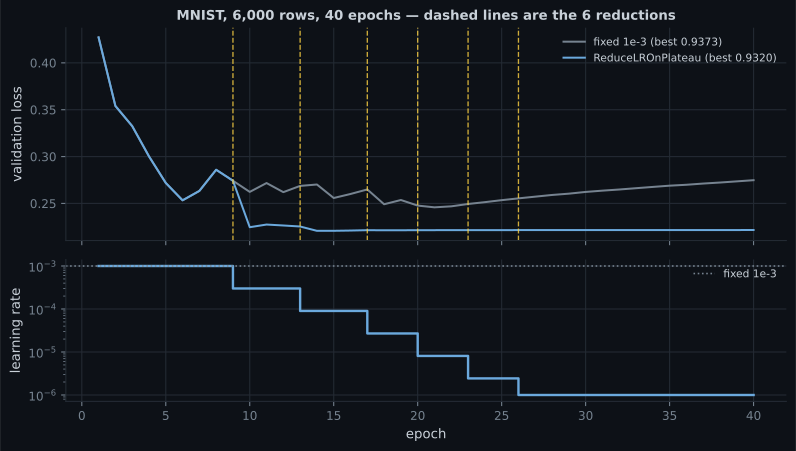
Section titled “ReduceLROnPlateau, watched rather than described”The callback is usually introduced as free insurance: when validation stops improving,
cut the learning rate. Here is what it actually did, with factor=0.3 and patience=3.
| Run | Best validation accuracy | Final | Last learning rate |
|---|---|---|---|
| Fixed 1e-3 | 0.9373 | 0.9367 | 1.00e-03 |
| ReduceLROnPlateau | 0.9320 | 0.9313 | 1.00e-06 |
This is not an argument against the callback — it is an argument for looking at the trace
rather than the docstring. patience=3 is short enough that ordinary epoch-to-epoch
noise in validation loss counts as a plateau, and factor=0.3 compounds: six firings
take 1e-3 to 1e-6, at which point training has stopped in all but name. A longer patience
and a gentler factor are the fix, and the trace is what tells you which one you need.
What checkpointing costs
Section titled “What checkpointing costs”ModelCheckpoint writes a full .keras archive — architecture, weights and
optimizer state. For a 269,322-parameter model over 8 epochs:
| Files written | Total bytes | |
|---|---|---|
| save every epoch | 8 | 26,060,320 |
save_best_only=True | 1 | 3,257,540 |
Each archive is 3.26 MB for a model whose raw float32 weights are 1.08 MB — the extra is Adam’s two slots per parameter plus container metadata, exactly as measured on the Keras APIs page. Saving every epoch of a real model is how you fill a disk overnight.
Use save_weights_only=True when you have the architecture in code and want the
files smaller, and add save_freq="epoch" deliberately rather than by accident.
Logging: History, CSVLogger, TensorBoard
Section titled “Logging: History, CSVLogger, TensorBoard”fit already returns everything it printed:
history = model.fit(...)
print(sorted(history.history.keys()))
# ['accuracy', 'loss', 'val_accuracy', 'val_loss']
print(len(history.history["loss"]))    # one entry per epoch actually run
For a run you want on disk in a form anything can read:
keras.callbacks.CSVLogger("log.csv")
# header:  epoch,accuracy,loss,val_accuracy,val_loss
# epoch 1: 0,0.6831666827201843,0.9038705229759216,0.7639999985694885,0.6423217058181763
Measured: three epochs produced four non-empty lines — a header and one row per
epoch. Note the epoch column is 0-indexed while every table in this phase counts
from 1.
And for the interactive view:
keras.callbacks.TensorBoard(log_dir="logs/run-01")
# then, in a terminal:  tensorboard --logdir logs
TensorBoard is worth reaching for when you have many runs to compare or want
per-layer weight and gradient histograms. For a single run, history.history plus
matplotlib answers most questions with less machinery — every figure in this phase
was made that way. Give each run its own log_dir, or the curves overlay each
other unreadably.
Pitfalls
Section titled “Pitfalls”- Treating
logs["loss"]inon_train_batch_endas the batch loss. It is a running epoch average; in epoch 1 the real batches spanned 0.4560 to 2.0592 against a printed 0.9039. - Monitoring
val_losswhen you care about accuracy. It cost 0.0093 accuracy here. Usemonitor="val_accuracy", mode="max"if that is the goal. - Reading validation metrics in
on_train_batch_end. They do not exist untilon_epoch_end. ModelCheckpointwithoutsave_best_only. Eight epochs wrote 26 MB; the best-only version wrote 3.26 MB.- Forgetting to reload the checkpoint.
ModelCheckpointwrites to disk but leaves the in-memory model at its final epoch. You mustload_modelafterwards. - Sharing one
log_diracross runs. TensorBoard overlays them into an unreadable mess. One directory per run. - Using both
EarlyStoppingandModelCheckpoint(save_best_only). Not wrong, but redundant — they select the same epoch. Keep the checkpoint for crash recovery, not for a second opinion. - Assuming
stop_trainingtakes effect immediately. It is checked at the end of the current epoch, so the epoch always completes.
- Callbacks fire at run, epoch and batch boundaries; validation metrics exist only
in
on_epoch_end, andself.model.stop_training = Trueends the run. logs["loss"]mid-epoch is a running average. Measured epoch 1: printed 0.9039, actual batches 0.4560 to 2.0592, sd 0.3501.- Four policies on identical models: fixed 40 epochs 0.8540, early stopping 0.8447, best-checkpoint 0.8447, plateau reduction 0.8613.
- Early stopping and best-only checkpointing produce identical weights; one saves compute, the other survives a crash.
- Stopping on
val_losscost 0.0093 accuracy while improving loss by 0.2394 — monitor what you will report. - Saving every epoch cost 26,060,320 bytes against 3,257,540 for best-only, because each archive carries the optimizer state too.
- A custom callback with a target threshold fired at epoch 36 of a 40-epoch budget and returned a 36-entry history.
Phase 2 is complete: gradients that survive depth, normalisation, regularisation, schedules, honest validation, and the callbacks that run it all. Phase 3 changes the architecture rather than the training — convolutional networks, where the input’s spatial structure becomes part of the model.
-
Inside on_train_batch_end, logs['loss'] in epoch 1 read 1.1317 mid-epoch while the individual batch losses ranged from 0.4560 to 2.0592. What is logs['loss']?
If you need true per-batch losses, evaluate the batch yourself after the step. The running average is a smoothed signal, not a measurement of one batch.
pch.quizShowAnswer
B — A cumulative average over all batches in the epoch so far, which is why it falls smoothly and why it does not describe any single state of the model — If you need true per-batch losses, evaluate the batch yourself after the step. The running average is a smoothed signal, not a measurement of one batch.
-
EarlyStopping(restore_best_weights=True) and ModelCheckpoint(save_best_only=True) gave identical test accuracy and loss. What actually differs between them?
Both hold the weights from the same best-val_loss epoch. Remember that ModelCheckpoint requires an explicit load_model afterwards.
pch.quizShowAnswer
B — Only the operational properties: early stopping ended after 17 epochs instead of 40 and saved compute, while checkpointing kept training but left the best weights on disk where they survive a crashed process — Both hold the weights from the same best-val_loss epoch. Remember that ModelCheckpoint requires an explicit load_model afterwards.
-
The 40-epoch fixed run scored 0.8540 test accuracy while early stopping on val_loss scored 0.8447. Was early stopping a mistake?
Setting monitor='val_accuracy', mode='max' is the fix if accuracy is the goal. The default monitors val_loss.
pch.quizShowAnswer
B — It depends on the metric: it improved test loss by 0.2394 while costing 0.0093 accuracy, because val_loss and val_accuracy disagree on the stopping epoch — monitor whichever one you will report — Setting monitor='val_accuracy', mode='max' is the fix if accuracy is the goal. The default monitors val_loss.
-
Why did checkpointing every epoch for 8 epochs write 26 MB for a model whose float32 weights are only 1.08 MB?
3.26 MB per archive against 1.08 MB of raw weights. save_weights_only=True shrinks it when the architecture lives in code.
pch.quizShowAnswer
B — Each .keras archive stores architecture, weights and optimizer state — Adam's two slots per parameter roughly triple the size — and there were eight of them — 3.26 MB per archive against 1.08 MB of raw weights. save_weights_only=True shrinks it when the architecture lives in code.
-
Your custom callback sets self.model.stop_training = True inside on_train_batch_end at batch 3 of 50. What happens?
The training loop checks the flag between epochs. Setting it mid-epoch works, but the current epoch always completes.
pch.quizShowAnswer
B — The flag is checked at the epoch boundary, so the remaining 47 batches of the epoch still run before fit returns — The training loop checks the flag between epochs. Setting it mid-epoch works, but the current epoch always completes.
🧪 Try It Yourself
Section titled “🧪 Try It Yourself”pch.coffeeTagline
pch.coffeeCtapch.feedbackHeading
pch.feedbackSubheading