
Building an ML API with Flask/FastAPI
What you’ll learn
Section titled “What you’ll learn”- the minimal prediction contract, and why the schema is the API
- the one operation that must happen at startup, never per request
- measured: per-call cost is flat from 2 to 128 rows, so batching is nearly free throughput
- input validation that rejects bad requests instead of predicting on them
- a health check that distinguishes “process alive” from “model usable”
- serving two model versions side by side for a canary
The contract
Section titled “The contract”An ML API is a normal HTTP service with one unusual property: the request schema is part of the model. Change the feature order, drop a column, or silently coerce a string to a float, and the model gives you a confident wrong answer rather than an error.
So the contract has to be explicit and enforced:
| Element | Decision |
|---|---|
| Route | POST /predict |
| Request body | JSON, one object per row, named fields — never a bare array |
| Response | The prediction, a probability, and the model version |
| Bad input | 422 with a message naming the offending field |
| Health | GET /health that actually exercises the model |
| Version | In the response body of every prediction |
Named fields matter more than they look. A bare [13.2, 0.7, 88, ...] means the caller has to know
your feature order, and the day someone reorders two columns you get no error and worse
predictions — the same silent failure as
dropping the scaler.
  flowchart TD
  R["POST /predict
JSON body"] --> V{"Schema valid?
fields present, in range"}
  V -->|"no"| E["422 naming the field.
The model is never called."]
  V -->|"yes"| B["Build the row in the
SERVER's column order"]
  B --> P["MODEL.predict_proba
(loaded at startup)"]
  P --> T{"probability >= threshold?"}
  T -->|"yes"| Y["label 1"]
  T -->|"no"| N["label 0"]
  Y --> O["Respond with label,
probability, model_version"]
  N --> O
The one thing that must not be in the request path
Section titled “The one thing that must not be in the request path”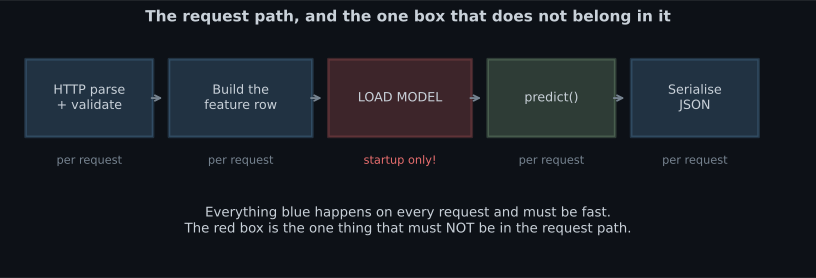
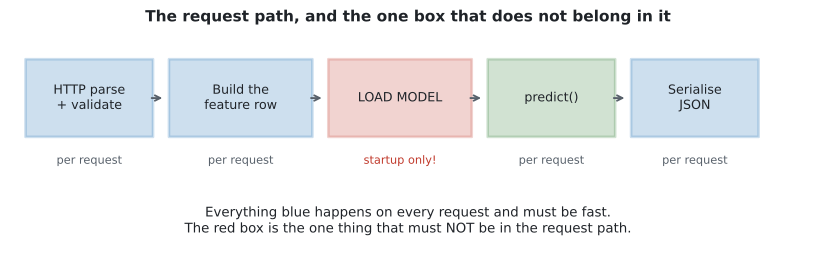
Loading a 1.3 MB forest means reading the file, decompressing it and rebuilding several thousand NumPy arrays. Doing that per request is pure waste: the result is identical every time.
# NO — the model is deserialised on every single request.
@app.post("/predict")
def predict(payload: Features):
    model = joblib.load("model.joblib")        # <- every request pays for this
    return {"prediction": int(model.predict(payload.to_row())[0])}


# YES — module scope, so it happens once when the worker boots.
MODEL = joblib.load("model.joblib")

@app.post("/predict")
def predict(payload: Features):
    return {"prediction": int(MODEL.predict(payload.to_row())[0])}
FastAPI’s lifespan handler is the tidier form, because it also gives you somewhere to fail
loudly if the artefact is missing or the version is wrong:
from contextlib import asynccontextmanager

import joblib
from fastapi import FastAPI

STATE = {}


@asynccontextmanager
async def lifespan(app: FastAPI):
    # Startup: load once, and refuse to boot if anything is wrong.
    STATE["model"] = joblib.load("model.joblib")
    STATE["version"] = "2026-08-03"
    assert hasattr(STATE["model"], "predict"), "artefact is not an estimator"
    yield
    STATE.clear()                              # shutdown


app = FastAPI(lifespan=lifespan)
Failing at boot is the point. A worker that starts successfully and then throws on the first prediction will pass a naive health check and take traffic.
Batching is nearly free
Section titled “Batching is nearly free”Once the model is loaded, the cost of a predict() call is dominated by fixed per-call overhead —
argument validation, array allocation, the Python-to-C boundary — not by the number of rows.
Measured across batch sizes on a 500-tree forest:
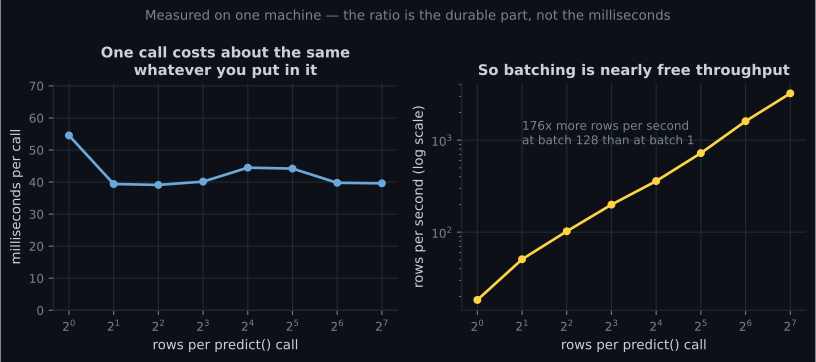
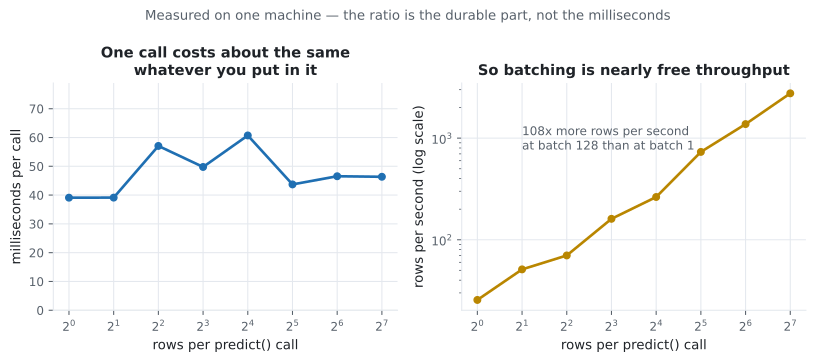
The consequence for API design: offer a batch endpoint. A caller with 500 rows to score should send one request, not 500.
from typing import List

import numpy as np
from fastapi import FastAPI, HTTPException
from pydantic import BaseModel, Field

MAX_BATCH = 1000


class Row(BaseModel):
    mean_radius: float = Field(..., gt=0, lt=100)
    mean_texture: float = Field(..., gt=0, lt=100)
    # ... one field per feature, with units and plausible bounds


class BatchRequest(BaseModel):
    rows: List[Row]


@app.post("/predict/batch")
def predict_batch(req: BatchRequest):
    if len(req.rows) > MAX_BATCH:
        raise HTTPException(413, f"at most {MAX_BATCH} rows per request")
    X = np.array([[r.mean_radius, r.mean_texture] for r in req.rows])
    proba = MODEL.predict_proba(X)[:, 1]
    return {
        "model_version": STATE["version"],
        "predictions": [
            {"label": int(p >= 0.5), "probability": round(float(p), 4)}
            for p in proba
        ],
    }
The MAX_BATCH cap is not optional. Without it a single request can allocate unbounded memory, and
that is a denial-of-service vector rather than a performance concern.
See it move
Section titled “See it move”Flat per-call cost has a consequence beyond throughput: it changes what your latency distribution looks like under load. The sketch is a queue simulator. Requests arrive at a rate you control, a single worker serves them, and the server either handles each request alone or sweeps up everything waiting into one call. The histogram is the observed latency; the numbers are p50 and p99.
Three lessons, none of which are about the model. Capacity is set by the fixed per-call cost: at 8 ms of overhead a single worker tops out near 125 requests per second regardless of how fast the forest is. p50 lies. Below capacity p50 stays close to the service time while p99 climbs, because tail latency is queue-waiting time, not compute. Batching moves the ceiling, not the model. Amortising one 8 ms call across 64 rows costs ms for 64 predictions instead of ms — the same measurement as the figure above, expressed as throughput. This is why a batch endpoint is an availability feature and not just a convenience.
FastAPI, end to end
Section titled “FastAPI, end to end”from contextlib import asynccontextmanager
import joblib
import numpy as np
from fastapi import FastAPI, HTTPException
from pydantic import BaseModel, Field
STATE: dict = {}
@asynccontextmanager
async def lifespan(app: FastAPI):
STATE["model"] = joblib.load("model.joblib")
STATE["version"] = "2026-08-03"
STATE["features"] = ["mean_radius", "mean_texture", "mean_perimeter"]
yield
STATE.clear()
app = FastAPI(title="Tumour classifier", version="1.0", lifespan=lifespan)
class Features(BaseModel):
"""The schema IS the contract. Bounds document the training range."""
mean_radius: float = Field(..., gt=0, lt=50, description="mm")
mean_texture: float = Field(..., gt=0, lt=50)
mean_perimeter: float = Field(..., gt=0, lt=300)
def to_row(self) -> np.ndarray:
return np.array([[self.mean_radius, self.mean_texture,
self.mean_perimeter]])
class Prediction(BaseModel):
label: int
probability: float
model_version: str
@app.post("/predict", response_model=Prediction)
def predict(payload: Features) -> Prediction:
model = STATE.get("model")
if model is None:
raise HTTPException(503, "model not loaded")
proba = float(model.predict_proba(payload.to_row())[0, 1])
return Prediction(label=int(proba >= 0.5),
probability=round(proba, 4),
model_version=STATE["version"])
@app.get("/health")
def health():
"""Exercise the model, do not just report that the process is up."""
model = STATE.get("model")
if model is None:
raise HTTPException(503, "model not loaded")
try:
probe = np.zeros((1, len(STATE["features"])))
model.predict(probe)
except Exception as exc:
raise HTTPException(503, f"model unusable: {exc}") from exc
return {"status": "ok", "model_version": STATE["version"]}Run it:
uvicorn app:app --host 0.0.0.0 --port 8000FastAPI gives you three things for free that matter here: request validation from the type
hints, OpenAPI docs at /docs that your callers can read, and response validation so a
malformed response is caught in your tests rather than in theirs.
Flask, for comparison
Section titled “Flask, for comparison”import joblib
import numpy as np
from flask import Flask, jsonify, request
app = Flask(__name__)
MODEL = joblib.load("model.joblib") # module scope: loaded once
VERSION = "2026-08-03"
FEATURES = ["mean_radius", "mean_texture", "mean_perimeter"]
@app.post("/predict")
def predict():
payload = request.get_json(silent=True)
if not isinstance(payload, dict):
return jsonify(error="body must be a JSON object"), 400
# Everything Pydantic did for free now has to be written by hand.
missing = [f for f in FEATURES if f not in payload]
if missing:
return jsonify(error=f"missing fields: {missing}"), 422
try:
row = np.array([[float(payload[f]) for f in FEATURES]])
except (TypeError, ValueError):
return jsonify(error="all fields must be numeric"), 422
proba = float(MODEL.predict_proba(row)[0, 1])
return jsonify(label=int(proba >= 0.5),
probability=round(proba, 4),
model_version=VERSION)
@app.get("/health")
def health():
try:
MODEL.predict(np.zeros((1, len(FEATURES))))
except Exception as exc:
return jsonify(status="unhealthy", detail=str(exc)), 503
return jsonify(status="ok", model_version=VERSION)| FastAPI | Flask | |
|---|---|---|
| Validation | From type hints | Hand-written |
| OpenAPI docs | Automatic at /docs | Add an extension |
| Async | Native | Via extensions |
| Lines for the same contract | Fewer | More |
| Ubiquity in existing codebases | Growing | Very high |
Choose FastAPI for a new ML service. Choose Flask when you are adding an endpoint to a Flask app that already exists.
Calling it
Section titled “Calling it”# A good request
curl -s -X POST http://localhost:8000/predict \
-H "Content-Type: application/json" \
-d '{"mean_radius": 14.2, "mean_texture": 20.1, "mean_perimeter": 92.0}'
# {"label":0,"probability":0.0731,"model_version":"2026-08-03"}
# A bad one — FastAPI rejects it before the model is ever called
curl -s -X POST http://localhost:8000/predict \
-H "Content-Type: application/json" \
-d '{"mean_radius": -5, "mean_texture": 20.1, "mean_perimeter": 92.0}'
# 422, "Input should be greater than 0"
# Health
curl -s http://localhost:8000/health
# {"status":"ok","model_version":"2026-08-03"}The bounds in the schema are doing real work in that second request. mean_radius: -5 is physically
impossible, and without the constraint the model would happily extrapolate and return a number.
Two versions at once
Section titled “Two versions at once”Rolling out a new model to 100% of traffic on day one is avoidable. Load both and route a fraction:
import hashlib

CANARY_FRACTION = 0.05


def pick_model(request_id: str):
    """Stable routing: the same caller always sees the same model version."""
    digest = hashlib.sha256(request_id.encode()).digest()
    bucket = digest[0] / 255.0
    if bucket < CANARY_FRACTION:
        return STATE["model_candidate"], STATE["version_candidate"]
    return STATE["model"], STATE["version"]
Hashing the request ID rather than calling random() matters: a given user gets a consistent
answer, and your comparison is not contaminated by the same caller bouncing between versions.
Because every response carries model_version, you can join predictions to outcomes later and
compare the two honestly.
Pitfalls
Section titled “Pitfalls”Loading the model inside the handler. Every caller pays to deserialise the artefact, for an identical result.
Accepting a bare array of features. The caller now owns your column order, and a reordering is a silent accuracy loss rather than an error.
A health check that returns 200 because the process is alive. It has to exercise the model. A worker whose artefact failed to load will otherwise be handed traffic.
No batch endpoint. The per-call cost is flat from 2 to 128 rows; forcing 500 single requests wastes almost all of that.
An unbounded batch size. One request allocating unbounded memory is a denial-of-service vector.
Omitting the model version from responses. Without it you cannot attribute a bad prediction to a release, and canary analysis is impossible.
Returning a raw probability with no threshold policy. Decide, document, and version the threshold; it is a business decision, not a modelling detail.
- The request schema is the contract. Named fields, explicit bounds, versioned responses.
- Load the artefact once at startup — ideally in a
lifespanhandler that refuses to boot on a bad model. - Per-call cost is flat from 2 to 128 rows, so throughput tracks batch size almost linearly. Offer a batch endpoint, and cap it.
- Validate before predicting. A
422is much better than a confident answer to nonsense. - A health check must exercise the model, not report that Python is running.
- Put
model_versionin every response, and route canaries by a hash of the request ID so a caller sees a stable answer.
-
Where should joblib.load() appear in a FastAPI prediction service?
Deserialising the artefact produces the same object on every call, so doing it per request is pure waste — and for a 1.3 MB forest it means rebuilding thousands of arrays each time. A lifespan handler also gives you a place to fail loudly at boot.
pch.quizShowAnswer
B — At startup — module scope or a lifespan handler — because the result is identical every time — Deserialising the artefact produces the same object on every call, so doing it per request is pure waste — and for a 1.3 MB forest it means rebuilding thousands of arrays each time. A lifespan handler also gives you a place to fail loudly at boot.
-
Per-call predict() time was roughly flat from 2 to 128 rows. What follows for your API?
When the cost is dominated by fixed overhead, throughput rises almost linearly with batch size. A caller with 500 rows should send one request. Cap the batch size, though, or you have created a memory-exhaustion vector.
pch.quizShowAnswer
B — Offer a batch endpoint — the fixed overhead dominates, so extra rows in one call are nearly free — When the cost is dominated by fixed overhead, throughput rises almost linearly with batch size. A caller with 500 rows should send one request. Cap the batch size, though, or you have created a memory-exhaustion vector.
-
Why accept named JSON fields rather than a bare array of feature values?
This is the same class of failure as saving a model without its scaler: the shapes still line up, nothing raises, and the answers get worse. Named fields with bounds make the contract explicit and checkable.
pch.quizShowAnswer
B — A bare array makes the caller responsible for column order, so a reordering silently degrades predictions instead of erroring — This is the same class of failure as saving a model without its scaler: the shapes still line up, nothing raises, and the answers get worse. Named fields with bounds make the contract explicit and checkable.
-
Your /health endpoint returns 200 whenever the web process is running. What can go wrong?
Liveness and readiness are different questions. The check must exercise the model — call predict on a probe row — so an orchestrator can tell 'process up' apart from 'able to serve'.
pch.quizShowAnswer
B — A worker whose model failed to load passes the check and gets sent live traffic — Liveness and readiness are different questions. The check must exercise the model — call predict on a probe row — so an orchestrator can tell 'process up' apart from 'able to serve'.
-
For a 5% canary, why hash the request ID instead of calling random()?
With random() the same user bounces between models between requests, which is confusing for them and mixes the two populations in your analysis. A stable hash gives each caller one version for the whole experiment.
pch.quizShowAnswer
B — It routes a given caller to the same version consistently, so users see stable behaviour and the comparison is not contaminated — With random() the same user bounces between models between requests, which is confusing for them and mixes the two populations in your analysis. A stable hash gives each caller one version for the whole experiment.
🧪 Try It Yourself
Section titled “🧪 Try It Yourself”Exercise 1 – Validate before predicting
Section titled “Exercise 1 – Validate before predicting”Exercise 2 – Build the feature row in the right order
Section titled “Exercise 2 – Build the feature row in the right order”Exercise 3 – Shape the response
Section titled “Exercise 3 – Shape the response”Exercise 4 – Cap the batch
Section titled “Exercise 4 – Cap the batch”Exercise 5 – Stable canary routing
Section titled “Exercise 5 – Stable canary routing”Exercise 6 – Price the batch endpoint
Section titled “Exercise 6 – Price the batch endpoint”Deploying ML Models to Streamlit — the other kind of deployment: a UI for humans rather than an endpoint for machines, and the one decorator that stops it reloading your model on every click.
pch.coffeeTagline
pch.coffeeCtapch.feedbackHeading
pch.feedbackSubheading