
Mixed Precision and Multi-GPU Training
Mixed precision is usually introduced as a free speed-up: change one line, get roughly 2× on modern GPUs. The line is real and so is the speed-up — on hardware that has float16 execution units.
This machine does not. Rather than describe a number that cannot be shown here, this page measures what the policy does on a CPU, which turns out to be the more useful lesson:
| Policy | ms/step | Relative | 3 epochs | Accuracy |
|---|---|---|---|---|
float32 | 18.92 | 1.00× | 5.9s | 0.9073 |
mixed_float16 | 769.21 | 40.65× | 144.8s | 0.9067 |
float64 | 67.50 | 3.57× | 15.9s | 0.9173 |
Mixed precision made training 40.65× slower and changed accuracy by 0.0006. The numerics are fine; the speed claim is entirely a property of the hardware, and applying the advice blindly on a CPU costs two orders of magnitude.
What you’ll learn
Section titled “What you’ll learn”- What
set_global_policy("mixed_float16")actually changes — variables, computation, and the layer it deliberately leaves alone. - Why float16 needs loss scaling, shown as the exact gradient magnitudes that vanish.
- Why the speed-up depends on hardware rather than on the model.
- What data parallelism across GPUs shares with this, and where it differs.
What the policy changes
Section titled “What the policy changes”keras.mixed_precision.set_global_policy("mixed_float16")| Layer | Variables | Computes in |
|---|---|---|
conv2d | float32 | float16 |
conv2d_1 | float32 | float16 |
dense | float32 | float16 |
dense_1 (output) | float32 | float32 |
The name is precise: it is mixed, not float16. The master copy of every weight stays in float32 — the optimiser needs that precision, because a float16 weight update is frequently smaller than the gap between two representable float16 values and would simply be lost. Only the forward and backward arithmetic runs in float16.
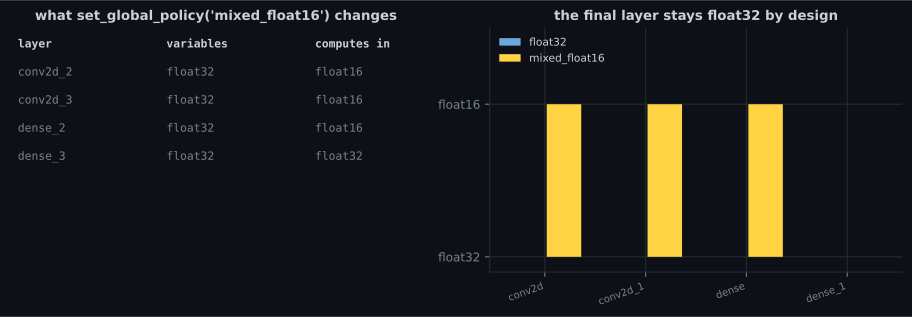
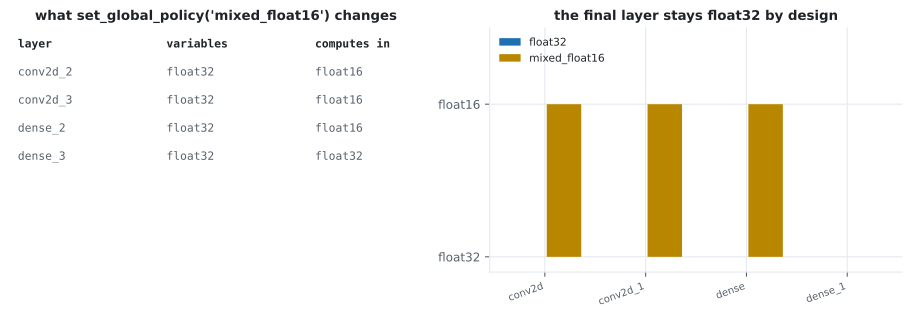
keras.layers.Dense(10, activation="softmax", dtype="float32")Why loss scaling exists
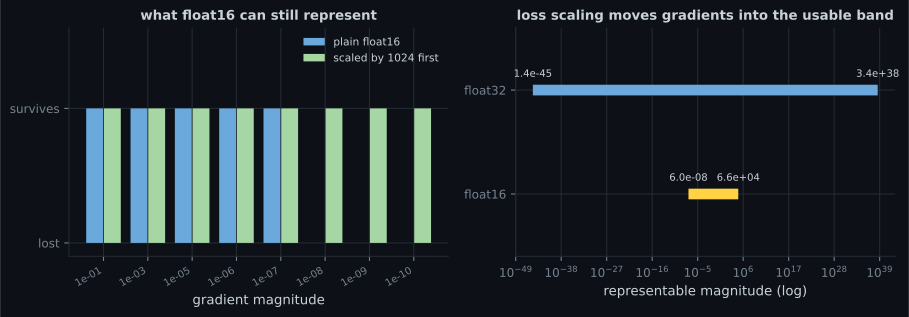
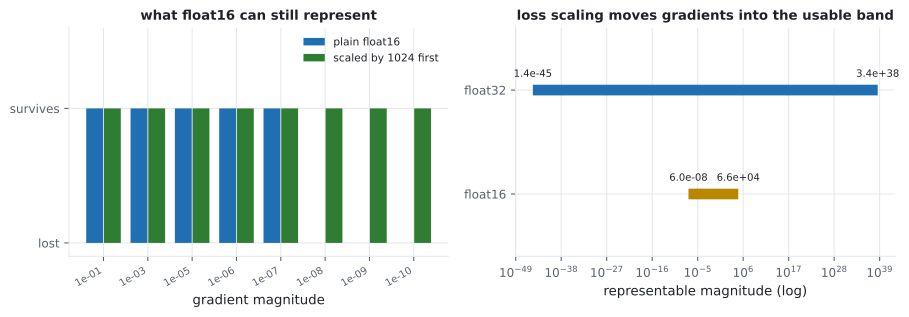
Section titled “Why loss scaling exists”float16 has about three decimal digits of precision and, more importantly, a narrow range: its smallest normal value is 6.1e-05 and its smallest subnormal is 6.0e-08. Gradients live below that more often than people expect.
| Gradient | As float16 | Survives | Scaled ×1024 | Survives |
|---|---|---|---|---|
| 1e-05 | 1.00e-05 | yes | 1.00e-05 | yes |
| 1e-07 | 1.19e-07 | yes | 1.00e-07 | yes |
| 1e-08 | 0.00e+00 | no | 1.00e-08 | yes |
| 1e-09 | 0.00e+00 | no | 9.90e-10 | yes |
| 1e-10 | 0.00e+00 | no | 1.16e-10 | yes |
optimizer = keras.mixed_precision.LossScaleOptimizer(keras.optimizers.Adam(1e-3))LossScaleOptimizer multiplies the loss before the backward pass and divides the gradients
afterwards, so the arithmetic is unchanged but the intermediate values sit in a range float16 can
represent. It also adapts the scale factor: if the gradients overflow to infinity it halves the
factor and skips that step; if they behave for long enough it doubles it.
Note the 1e-07 row: the scaled version reads 1.00e-07 while the unscaled reads 1.19e-07. Both survive, but the scaled one is more accurate — it was rounded at a finer resolution before being divided back down.
Why it is slower here
Section titled “Why it is slower here” flowchart TD
P["set_global_policy('mixed_float16')"] --> C{"does the hardware have
float16 execution units?"}
C -->|"GPU tensor cores"| G["float16 matmuls run natively
roughly 2x, less memory traffic"]
C -->|"this CPU"| N["no float16 units:
convert to float32, compute, convert back"]
N --> R["40.65x SLOWER
18.92 ms to 769.21 ms"]
G --> W["the advertised win"]
A CPU has no float16 arithmetic. Every float16 tensor must be widened to float32 to be operated on and narrowed again afterwards, so the policy adds two conversions per operation and removes nothing. That is the entire explanation for 40.65×.
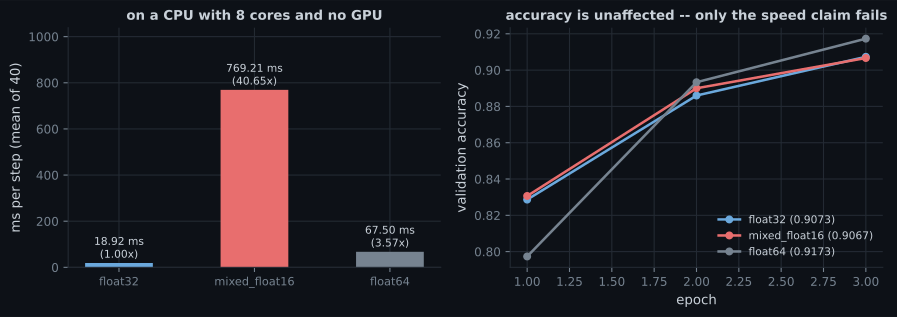
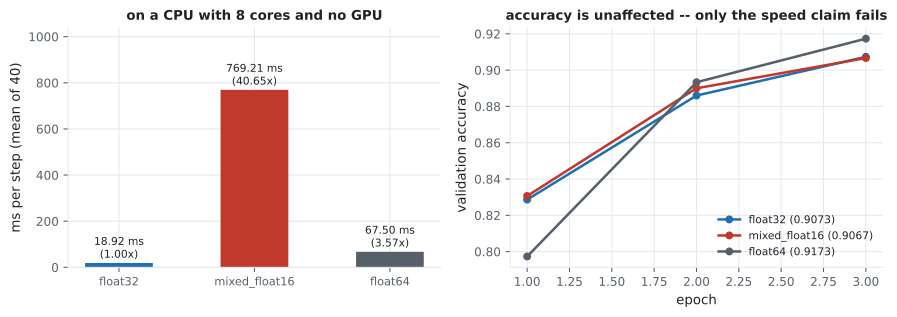
The practical rule follows directly: mixed precision is a hardware feature, not a model feature. Measure one epoch before adopting it. On a GPU with tensor cores it usually pays; on CPU it is catastrophic; on an older GPU without tensor cores it is roughly neutral.
Multi-GPU, briefly
Section titled “Multi-GPU, briefly”Data parallelism is measured properly on the distributed training page, but it shares this page’s shape: a one-line API whose benefit depends entirely on hardware that may not be present.
strategy = tf.distribute.MirroredStrategy()
keras.mixed_precision.set_global_policy("mixed_float16")

with strategy.scope():
    model = build_model()                      # variables mirrored per replica
    model.compile(keras.mixed_precision.LossScaleOptimizer(
        keras.optimizers.Adam(1e-3)), loss, metrics=["accuracy"])
They compose: each replica computes in float16, gradients are all-reduced in float32, and the master weights stay float32 on every device. The two failure modes also compose — a model that diverges under mixed precision will diverge on every replica at once, and the mirrored variables make it slightly harder to see which one started it.
Pitfalls
Section titled “Pitfalls”- Assuming the speed-up is universal. 40.65× slower here; the advertised ~2× requires tensor cores.
- Leaving the output layer in float16. A float16 softmax loses precision exactly where the
loss gradient comes from; pin it with
dtype="float32". - Skipping
LossScaleOptimizer. Gradients at 1e-8 and below become exactly 0.0, silently. - Believing “mixed” means everything is float16. Variables stay float32; only the arithmetic changes.
- Debugging a divergence without switching the policy off first. Establish whether the model trains in float32 before blaming precision.
- Measuring the policy on a model too small to be compute-bound. The overhead per operation dominates and the result says nothing about a real workload.
- Using float64 “to be safe”. It cost 3.57× here and gained 0.0100 accuracy, which is within run-to-run noise.
mixed_float16keeps variables in float32 and runs the arithmetic in float16, except the output layer.- On this CPU it was 40.65× slower, because there are no float16 execution units to use.
- Accuracy was unaffected (0.9073 against 0.9067), so the numerics work — only the speed claim is hardware-dependent.
- float16’s smallest normal value is 6.1e-05; gradients at 1e-8 vanish to exactly zero without loss scaling.
LossScaleOptimizermultiplies the loss, divides the gradients, and adapts the factor when it overflows.- Mixed precision and data parallelism compose, and so do their failure modes.
Once training is finished and the model is fast enough, it has to be reachable by something other than a Python script: Serving Models with TensorFlow Serving.
-
Mixed precision made training 40.65x slower on this machine while accuracy stayed at 0.9067 against 0.9073. What does that show?
The unchanged accuracy is the control: the arithmetic is adequate. Only the performance claim depends on tensor cores being present.
pch.quizShowAnswer
B — The speed-up is a property of the hardware, not the model — a CPU has no float16 execution units, so every float16 tensor is widened to float32 and narrowed again, adding conversions and removing nothing — The unchanged accuracy is the control: the arithmetic is adequate. Only the performance claim depends on tensor cores being present.
-
Under a mixed_float16 policy, what dtype are the model's weights stored in?
That is what 'mixed' means: float32 variables, float16 arithmetic. Only the computation changes dtype.
pch.quizShowAnswer
B — float32 — the master copy stays in full precision because a float16 weight update is often smaller than the gap between two representable float16 values and would be lost entirely — That is what 'mixed' means: float32 variables, float16 arithmetic. Only the computation changes dtype.
-
Why must the output layer be pinned to float32 with dtype='float32'?
Keras leaves this to you, which makes it an easy silent mistake when adopting the policy.
pch.quizShowAnswer
B — Because a float16 softmax loses precision exactly where it matters — the largest logit dominates the exponentials and the small differences between remaining classes are what the loss gradient depends on — Keras leaves this to you, which makes it an easy silent mistake when adopting the policy.
-
A gradient of 1e-8 converts to exactly 0.00e+00 in float16. What does LossScaleOptimizer do about it?
It also adapts the factor — halving it and skipping the step on overflow, doubling it after a stable run.
pch.quizShowAnswer
B — It multiplies the loss before the backward pass so intermediate gradients land inside float16's representable range, then divides the gradients afterwards to restore their true scale — It also adapts the factor — halving it and skipping the step on overflow, doubling it after a stable run.
-
float64 was 3.57x slower than float32 while mixed_float16 was 40.65x slower. Why is the float64 penalty so much smaller?
3.57x is roughly what doing more real work costs. 40.65x is the signature of overhead rather than computation.
pch.quizShowAnswer
B — The CPU can execute float64 arithmetic natively, so it is genuinely doing more work; float16 is not executable at all and must be converted in both directions around every operation — 3.57x is roughly what doing more real work costs. 40.65x is the signature of overhead rather than computation.
🧪 Try It Yourself
Section titled “🧪 Try It Yourself”pch.coffeeTagline
pch.coffeeCtapch.feedbackHeading
pch.feedbackSubheading