
Data Validation and Schema Contracts
What you’ll learn
Section titled “What you’ll learn”- which data corruptions sklearn catches for you, and which it serves happily: 0.8500 → 0.7125
- why passing a numpy array instead of a DataFrame disables the only check you were getting
- a schema contract in about forty lines that catches 6 of 6 corruptions in 6.65 ms
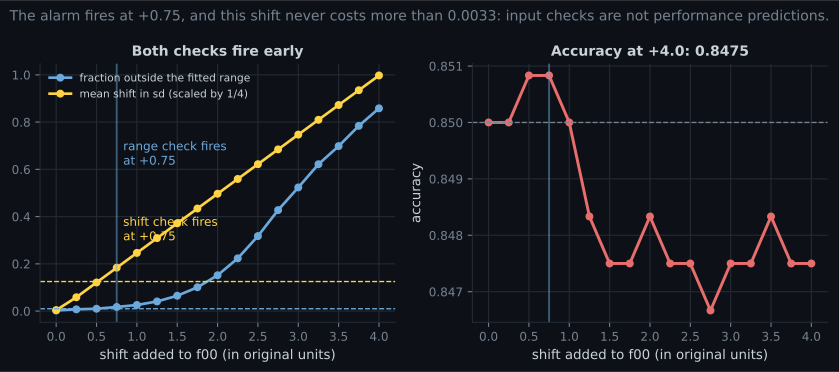
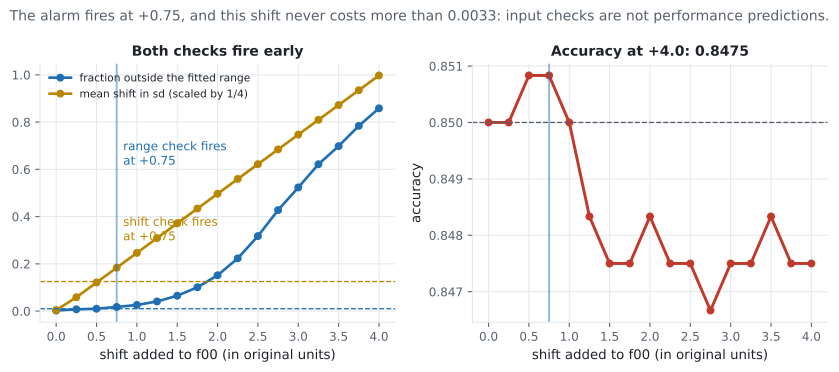
- how to set range and shift thresholds, and why they fire at +0.75 when accuracy has not moved
- the honest limit: a validation alarm is not a performance prediction
- where
pandera, Great Expectations andpydanticfit, and what they do not solve
Six corruptions, one fitted pipeline
Section titled “Six corruptions, one fitted pipeline”A StandardScaler plus logistic regression, fitted once on 2,800 rows and scoring 0.8500 on 1,200
clean test rows. Now hand it the same rows, corrupted six ways that all have production analogues.
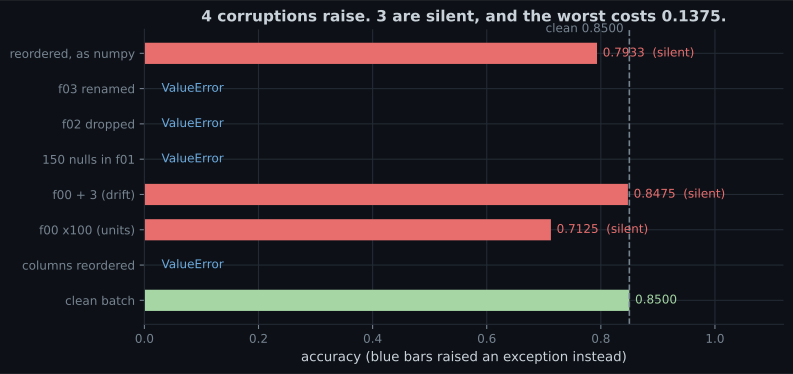
| Corruption | Real-world cause | Outcome |
|---|---|---|
| columns reordered (DataFrame) | a SELECT * after a migration | ValueError |
f02 dropped | upstream table changed | ValueError |
f03 renamed | a “harmless” rename | ValueError |
150 nulls in f01 | a failed join | ValueError |
f00 × 100 | cents instead of euros | 0.7125 (silent) |
f00 + 3 | a recalibrated sensor | 0.8475 (silent) |
| columns reordered, as numpy | df.values in the serving path | 0.7933 (silent) |
Three observations that determine everything below.
sklearn’s DataFrame name check is the cheapest validation you will ever get. It caught four of seven. Keep your serving path on DataFrames with real column names for that reason alone.
df.to_numpy() throws it away. The same reordering that raised a ValueError as a DataFrame
silently costs 0.0567 as an array. Every .values or .to_numpy() between your feature code and
your model is a place where column order becomes a convention rather than a contract.
Nothing in sklearn checks values. A column in the wrong units is the right shape, the right dtype and the right name. Only a comparison against what training looked like can catch it.
A schema contract in forty lines
Section titled “A schema contract in forty lines”Fit the contract on the training frame, then check every batch against it. Everything below is
pandas and nothing else.
def fit_schema(df, quantile=0.001):
    """Everything about the training frame a serving batch should still satisfy."""
    return {
        "columns": list(df.columns),
        "dtypes": {c: str(df[c].dtype) for c in df.columns},
        "lower": {c: float(df[c].quantile(quantile)) for c in df.columns},
        "upper": {c: float(df[c].quantile(1 - quantile)) for c in df.columns},
        "mean": {c: float(df[c].mean()) for c in df.columns},
        "std": {c: float(df[c].std()) for c in df.columns},
        "null_rate": {c: float(df[c].isna().mean()) for c in df.columns},
        "rows_fitted": len(df),
    }


def validate(df, schema, max_out_of_range=0.01, max_shift=0.5,
             max_null_increase=0.01):
    """One message per violated expectation. Empty list means the batch is usable."""
    problems = []
    if list(df.columns) != schema["columns"]:
        missing = [c for c in schema["columns"] if c not in df.columns]
        extra = [c for c in df.columns if c not in schema["columns"]]
        if missing:
            problems.append(f"missing columns: {missing}")
        if extra:
            problems.append(f"unexpected columns: {extra}")
        if not missing and not extra:
            problems.append("columns in a different ORDER")

    for c in schema["columns"]:
        if c not in df.columns:
            continue
        if str(df[c].dtype) != schema["dtypes"][c]:
            problems.append(f"{c}: dtype {df[c].dtype} != {schema['dtypes'][c]}")
        nulls = float(df[c].isna().mean())
        if nulls > schema["null_rate"][c] + max_null_increase:
            problems.append(f"{c}: null rate {nulls:.4f} "
                            f"(fitted {schema['null_rate'][c]:.4f})")
        col = df[c].dropna()
        if len(col) == 0:
            continue
        out = float(((col < schema["lower"][c]) | (col > schema["upper"][c])).mean())
        if out > max_out_of_range:
            problems.append(f"{c}: {out:.2%} of values outside the fitted range")
        shift = abs(col.mean() - schema["mean"][c]) / max(schema["std"][c], 1e-12)
        if shift > max_shift:
            problems.append(f"{c}: mean shifted {shift:.2f} sd")
    return problems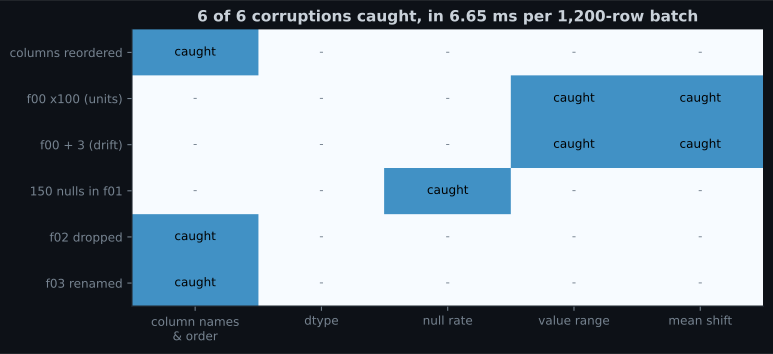
| Corruption | Which check caught it |
|---|---|
| columns reordered | column names & order |
f02 dropped | column names & order |
f03 renamed | column names & order (missing and unexpected) |
150 nulls in f01 | null rate |
f00 × 100 | value range and mean shift |
f00 + 3 | value range and mean shift |
6.65 ms for 1,200 rows across 25 columns. On a per-request path that is too slow to run on every
call; the pattern that works is to validate per batch and, for single-row requests, keep only the
cheap checks — names, dtypes, and per-field ranges, which is exactly what a pydantic model gives you.
Choosing thresholds
Section titled “Choosing thresholds”The two value checks need numbers, and the numbers determine whether you get useful alarms or noise.
| Check | Threshold used | Why |
|---|---|---|
max_out_of_range | 1% of values outside the fitted 0.1–99.9 percentile | With clean data this is ≈0.2% by construction, so 1% is a real signal |
max_shift | 0.5 sd of the training column | Below this, batch-to-batch sampling noise dominates |
max_null_increase | +1 percentage point | Null rates are usually stable; a jump means a join broke |
And the finding that matters most on this page:
A validation alarm is not a performance prediction. The shift of +0.75 that trips both checks costs essentially nothing (0.8508 against a clean 0.8500), and even +4.0 costs 0.0025. This is the same result as input drift monitoring in Phase 08, where PSI reached 2.0847 with accuracy at 0.9995.
The correct reading is not “these checks are useless”. It is:
- Data validation answers “is this batch like the training data?” — a question about the input, answerable immediately, with no labels.
- Model monitoring answers “is the model still right?” — a question about the output, answerable only when labels arrive.
- The first is a precondition, not a proxy. Run it because a batch that violates the contract may be catastrophic (0.7125) or harmless (0.8475) and you cannot tell which from the model’s output, which will look perfectly normal either way.
Practical policy: hard-fail on schema, dtype and null violations, because those are almost always genuine bugs; warn and investigate on range and shift, because those are often legitimate change in the world.
See it move
Section titled “See it move”The uncomfortable part of this page is that “alarm fired” and “model broke” are close to independent. The sketch makes that a two-by-two you can watch fill up: it cycles through the seven batches measured above, shows which gates catch each one, and plots the resulting accuracy against the alarm state.
The two off-diagonal quadrants are the whole design problem. f00 + 3 fires two gates and costs
0.0025, so a team that pages on every alarm learns to ignore them. The numpy reordering fires nothing
and costs 0.0567, so a team that trusts silence ships it. Neither is fixed by tightening a threshold —
the first needs a severity policy, and the second needs a contract that survives leaving pandas.
Where the libraries fit
Section titled “Where the libraries fit” flowchart TD
A["A batch arrives"] --> B{"Right columns,
right types?"}
B -->|"no"| C["HARD FAIL.
Do not predict.
This is a bug upstream."]
B -->|"yes"| D{"Null rates
as expected?"}
D -->|"no"| C
D -->|"yes"| E{"Values in the
fitted ranges?"}
E -->|"no"| F["WARN. Predict, but flag
the batch and page a human.
Could be units, could be
the world changing."]
E -->|"yes"| G["Predict"]
F --> G
G --> H["Log the validation result
NEXT TO the prediction,
so a later investigation
can join them"]
| Tool | What it gives you | What it still will not do |
|---|---|---|
| sklearn feature names | Free, automatic column-name and order checking on DataFrames | Nothing about values; nothing for numpy input |
| pydantic | Per-request field types and bounds, fast, great error messages | Statistics across a batch; distribution shift |
| pandera | Declarative DataFrame schemas, including statistical checks | Deciding your thresholds for you |
| Great Expectations | A large check library, data docs, profiling to seed expectations | Being lightweight; it is a system, not a function |
| the forty lines above | All six catches, zero dependencies, one JSON file | A UI, or anyone else maintaining it |
The choice matters much less than the fields you check. A schema that omits value ranges will pass the unit-change batch no matter which library wrote it.
Pitfalls
Section titled “Pitfalls”| Pitfall | Why it bites | What to do |
|---|---|---|
to_numpy() in the serving path | Disables the name check; reordering cost 0.0567 silently | Keep DataFrames end to end |
| No value-range checks | A unit change cost 0.1375 with no error | Fit percentile bounds per column |
| Trusting a NaN-tolerant model | Boosting served 150 nulls without complaint | Check null rates explicitly |
| Treating a validation alarm as a performance alarm | +0.75 fired both checks and cost 0.0000 | Hard-fail on schema, investigate on statistics |
| Thresholds copied from a blog | Your columns have your own variance | Fit them from training data, then tighten with experience |
| Validating only at training time | The corruption happens later, in serving | Same contract, both sides, same code |
| A schema not versioned with the model | Silently checks the wrong expectations | Serialise them together |
| Logging the prediction but not the validation result | You cannot join the two afterwards | Log both, with the same request id |
- Of seven corrupted batches, 4 raised a
ValueErrorand 3 were served silently; the worst silent one cost 0.1375 accuracy (0.8500 → 0.7125). - Reordering columns raised as a DataFrame and cost 0.0567 silently as a numpy array.
- A 40-line schema contract caught 6 of 6 corruptions in 6.65 ms per 1,200-row batch.
- Each corruption tripped a different check, which is why you need all five.
- The range and shift checks fired at a shift of +0.75, where accuracy was 0.8508 against a clean 0.8500 — validation is a precondition, not a performance prediction.
- Hard-fail on schema, dtype and nulls; warn and investigate on range and shift.
-
Your serving code does model.predict(df.to_numpy()). What have you given up?
The name check caught four of seven corruptions for free. Converting to numpy makes column order a convention that no code enforces, and a reordering then produces confident, wrong predictions.
pch.quizShowAnswer
B — sklearn's feature-name check — the same column reordering that raises a ValueError for a DataFrame silently cost 0.0567 accuracy as an array — The name check caught four of seven corruptions for free. Converting to numpy makes column order a convention that no code enforces, and a reordering then produces confident, wrong predictions.
-
A column arrives in cents instead of euros. Which check catches it?
The batch is the right shape in every structural sense, which is why it costs 0.1375 accuracy in silence. Range and shift checks are the two that no library gives you by default and the two that catch value corruption.
pch.quizShowAnswer
B — A value-range check against the training percentiles — 97% of values fell outside them, while names, dtypes and null rates were all perfect — The batch is the right shape in every structural sense, which is why it costs 0.1375 accuracy in silence. Range and shift checks are the two that no library gives you by default and the two that catch value corruption.
-
Your range check fires on a batch and accuracy is unchanged. Was the check wrong?
Input validation and performance monitoring are different questions. The same +0.75 shift could have been a unit change costing 0.1375 — and from the model's output alone the two look identical, which is exactly why the input check exists.
pch.quizShowAnswer
B — No: it answered the question it was asked — 'is this batch like training data?' — and a shift of +0.75 tripped it while accuracy went from 0.8500 to 0.8508 — Input validation and performance monitoring are different questions. The same +0.75 shift could have been a unit change costing 0.1375 — and from the model's output alone the two look identical, which is exactly why the input check exists.
-
Which violations should hard-fail rather than warn?
A missing or renamed column, a changed dtype or a jump in null rate means something broke in the pipeline, and predicting anyway produces garbage with a normal-looking latency. A distribution shift may just be Tuesday.
pch.quizShowAnswer
B — Schema, dtype and null-rate violations — those are almost always upstream bugs; range and shift are often legitimate change and deserve investigation instead — A missing or renamed column, a changed dtype or a jump in null rate means something broke in the pipeline, and predicting anyway produces garbage with a normal-looking latency. A distribution shift may just be Tuesday.
-
Where should the fitted schema live?
Percentiles, means and null rates come from the training data. A schema fitted on different data than the model checks the wrong expectations, and recomputing it from the serving batch would validate the batch against itself.
pch.quizShowAnswer
B — Serialised beside the model and versioned with it — it is a fitted artefact of the training data, exactly like the scaler — Percentiles, means and null rates come from the training data. A schema fitted on different data than the model checks the wrong expectations, and recomputing it from the serving batch would validate the batch against itself.
🧪 Try It Yourself
Section titled “🧪 Try It Yourself”Exercise 1 – Corrupt a batch six ways
Section titled “Exercise 1 – Corrupt a batch six ways”Exercise 2 – Fit the contract
Section titled “Exercise 2 – Fit the contract”Exercise 3 – Catch all six
Section titled “Exercise 3 – Catch all six”Exercise 4 – Find where the alarm starts
Section titled “Exercise 4 – Find where the alarm starts”Exercise 5 – Serialise the contract with the model
Section titled “Exercise 5 – Serialise the contract with the model”Feature Stores and Training-Serving Skew — the contract above assumes the serving batch is trying to look like training data. The next page is about the case where two different code paths compute the same feature, and quietly disagree.
pch.coffeeTagline
pch.coffeeCtapch.feedbackHeading
pch.feedbackSubheading