
Dockerizing an ML Application
What you’ll learn
Section titled “What you’ll learn”- why a container is the only artefact that actually pins “the environment”
- what drives image size, measured: serving stack 190 MB against 1,693 MB installed
- the layer ordering that turns a 3-minute rebuild into a 3-second one
- baking the model in against mounting it, and when each is right
- a health check Docker itself runs, and why the container should not run as root
Why a container
Section titled “Why a container”The environment page
argued that a reproducible result needs four things: the code, the data, the seeds and the
environment. A requirements.txt pins the third-party Python packages. It does not pin the Python
build, the C libraries NumPy links against, the BLAS implementation, the locale, or the OS.
A container image pins all of it. That is the whole value proposition, and for machine learning it matters more than for most software, because a different BLAS can reassociate floating-point sums and quietly change your predictions.
| Pinned by | Python packages | Python build | System libs | OS |
|---|---|---|---|---|
requirements.txt | ✅ | ❌ | ❌ | ❌ |
Lock file + .python-version | ✅ | ✅ | ❌ | ❌ |
| conda environment export | ✅ | ✅ | partly | ❌ |
| Container image | ✅ | ✅ | ✅ | ✅ |
  flowchart LR
  C["Your code
(git)"] --> I["Container image
ml-api:2026-08-03"]
  D["requirements-serve.txt
pinned versions"] --> I
  M["model-2026-08-03.joblib"] --> I
  B["Base image
python:3.11-slim"] --> I
  I --> R1["dev"]
  I --> R2["staging"]
  I --> R3["production"]
  E["Environment variables"] --> R1
  E --> R2
  E --> R3
One image, three environments, differing only by configuration. That is the arrangement the rest of this page is building toward.
What actually makes the image big
Section titled “What actually makes the image big”Almost nobody’s image is big because of their code. It is big because of what got installed.
Measured installed sizes in the environment that built this page:
| Package | Installed size | In a serving image? |
|---|---|---|
| joblib | 2 MB | ✅ required |
| matplotlib | 31 MB | ❌ plotting is not serving |
| numpy | 33 MB | ✅ required |
| scikit-learn | 42 MB | ✅ required |
| pandas | 64 MB | ⚠️ only if you use DataFrames at inference |
| scipy | 113 MB | ✅ scikit-learn depends on it |
| tensorflow | 1,409 MB | ❌ unless you actually serve a TF model |
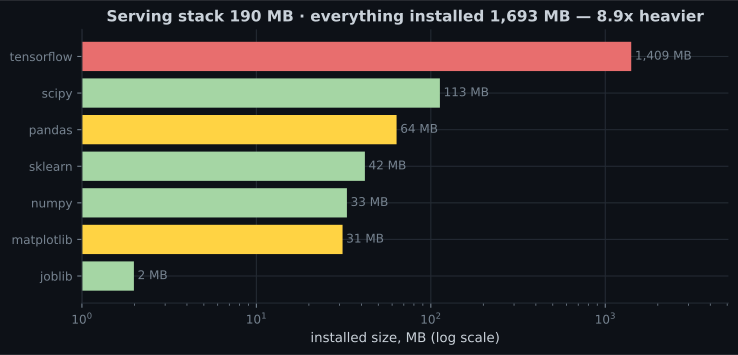
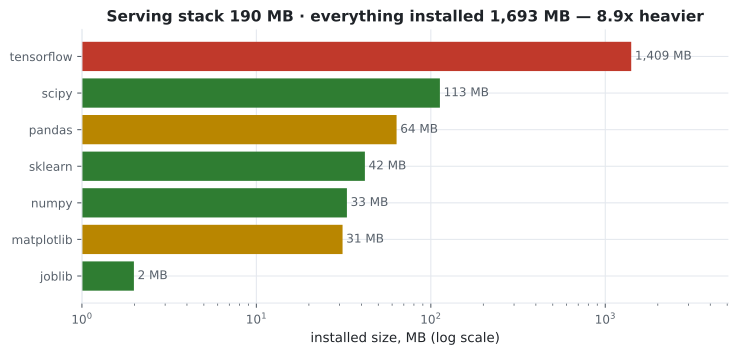
A scikit-learn serving stack — numpy, scipy, scikit-learn, joblib — is 190 MB. Install everything from a research notebook and the same environment is 1,693 MB, 8.9× heavier, with TensorFlow alone accounting for 1.4 GB of it.
So the single most effective thing you can do about image size is have a separate
requirements-serve.txt that contains only what inference needs:
scikit-learn==1.9.0
joblib==1.5.3
fastapi==0.115.0
uvicorn[standard]==0.32.0
pydantic==2.9.0
numpy and scipy arrive as scikit-learn dependencies. matplotlib, seaborn, jupyter and tensorflow do not appear because the service does not import them.
Layer ordering
Section titled “Layer ordering”Docker caches each instruction as a layer. When an instruction’s inputs change, that layer and every layer after it rebuild. So the order of your Dockerfile determines how long your inner loop takes.
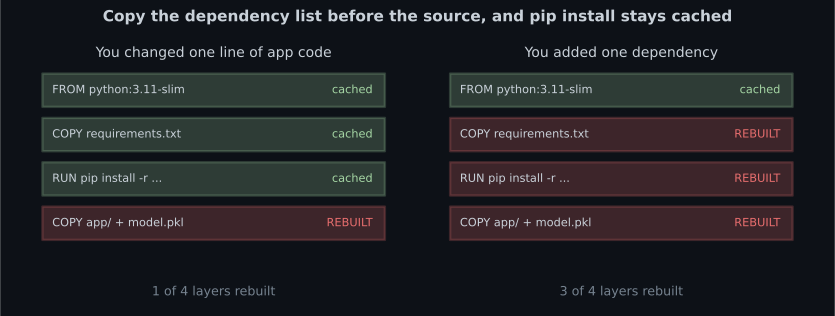
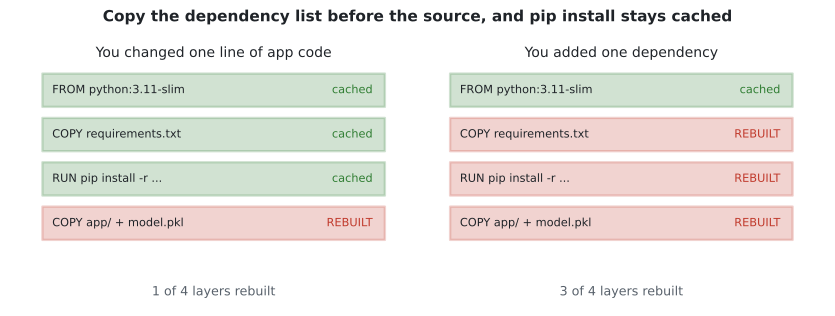
The rule: copy the thing that changes least, first.
FROM python:3.11-slim

# System packages first — these change almost never.
RUN apt-get update && apt-get install -y --no-install-recommends \
      curl \
    && rm -rf /var/lib/apt/lists/*

WORKDIR /app

# Dependencies BEFORE source. This layer is cached until the file changes.
COPY requirements-serve.txt .
RUN pip install --no-cache-dir -r requirements-serve.txt

# Source and model last — these change every commit.
COPY app/ ./app/
COPY model.joblib .

# Do not run as root.
RUN useradd --create-home --uid 1000 appuser && chown -R appuser /app
USER appuser

EXPOSE 8000
HEALTHCHECK --interval=30s --timeout=3s --start-period=20s --retries=3 \
  CMD curl -fsS http://localhost:8000/health || exit 1

CMD ["uvicorn", "app.main:app", "--host", "0.0.0.0", "--port", "8000"]
Four details in that file are doing real work:
--no-cache-dir stops pip keeping a wheel cache inside the image. It is free size savings.
--no-install-recommends plus rm -rf /var/lib/apt/lists/* in the same RUN. Cleaning up in
a later instruction does not help — the deleted files still exist in the earlier layer.
USER appuser because a container process running as root that gets compromised is running as
root on your host kernel. This is one line.
HEALTHCHECK calling the endpoint that
actually exercises the model,
so an orchestrator can tell a broken container apart from a slow one.
See it move
Section titled “See it move”Layer invalidation is a cascade, which is hard to see in a static diagram and obvious in an animation. The sketch holds the same Dockerfile in two orderings — dependencies-then-source, and source-then-dependencies — and fires the change events a real project actually experiences: many code edits, occasional dependency bumps, rare base-image updates. Layers rebuild in amber, hit cache in green, and the tally at the bottom is minutes of build time you either spend or do not.
Trace one code edit through both stacks. Good ordering: COPY app/ and COPY model.joblib rebuild,
2 + 3 = 5 seconds. Bad ordering: COPY app/ invalidates, and everything after it — the model
copy, the requirements copy, and the 95-second pip install — rebuilds too, for
2 + 3 + 1 + 95 = 101 seconds. Same image, same content, 20× the wait, and code edits are around
78% of all builds. The fix is which line you write first.
.dockerignore
Section titled “.dockerignore”Without one, COPY app/ ./app/ sends your entire build context to the daemon — including .git,
.venv, notebooks, and the raw training data.
.git
.venv
__pycache__/
*.pyc
.pytest_cache/
notebooks/
data/
tests/
*.ipynb
.env
.streamlit/secrets.toml
README.md
Note .env and secrets.toml on that list. A secret copied into an image is in the image forever
— deleting it in a later layer does not remove it, and anyone who can pull the image can read it.
Bake the model in, or mount it
Section titled “Bake the model in, or mount it”| Bake into the image | Mount at runtime | |
|---|---|---|
| Reproducibility | Exact — image tag identifies the model | Image and model version separately |
| Rollback | Redeploy the previous tag | Repoint the volume |
| Image size | Larger | Smaller |
| New model | Rebuild and redeploy | Restart, or hot-reload |
| Best for | Production | Development, very large models |
Bake it in for production. The image tag then identifies exactly one model plus exactly one code version, which is what makes “roll back to yesterday” a single command rather than an investigation.
# Development: iterate on the model without rebuilding.
docker run -p 8000:8000 -v "$(pwd)/models:/app/models:ro" ml-api:dev

# Production: everything in the tag.
docker build -t ml-api:2026-08-03 .
docker run -p 8000:8000 ml-api:2026-08-03
The :ro on the volume mount is deliberate — the service has no reason to write to its model
directory.
Building and running
Section titled “Building and running”# Build, tagged with something meaningful. Never rely on :latest.
docker build -t ml-api:2026-08-03 .
# Run it, with the port mapped and the config from the environment.
docker run --rm -p 8000:8000 \
-e MODEL_PATH=/app/model.joblib \
-e LOG_LEVEL=info \
--name ml-api \
ml-api:2026-08-03
# Confirm the container thinks it is healthy.
docker inspect --format='{{.State.Health.Status}}' ml-api
# Look at what you built.
docker images ml-api
docker history ml-api:2026-08-03 # which layer is enormous, and whydocker history is the tool to reach for when an image is unexpectedly large. It shows the size
each instruction contributed, which usually points straight at a pip install that pulled in
something you did not intend.
Read configuration from the environment, never from a baked-in constant:
import os

MODEL_PATH = os.environ.get("MODEL_PATH", "model.joblib")
PORT = int(os.environ.get("PORT", "8000"))
LOG_LEVEL = os.environ.get("LOG_LEVEL", "info")
MAX_BATCH = int(os.environ.get("MAX_BATCH", "1000"))
The same image then runs in dev, staging and production with different settings — which is the point of building an image at all.
Multi-stage builds
Section titled “Multi-stage builds”If your build needs compilers that your runtime does not, build in one stage and copy only the result into a clean second stage:
# ---- build stage: has gcc, produces wheels ----
FROM python:3.11 AS builder
WORKDIR /build
COPY requirements-serve.txt .
RUN pip wheel --no-cache-dir --wheel-dir /wheels -r requirements-serve.txt

# ---- runtime stage: no compilers, no build tools ----
FROM python:3.11-slim
WORKDIR /app
COPY --from=builder /wheels /wheels
RUN pip install --no-cache-dir --no-index --find-links=/wheels /wheels/* \
    && rm -rf /wheels
COPY app/ ./app/
COPY model.joblib .
RUN useradd --create-home --uid 1000 appuser && chown -R appuser /app
USER appuser
CMD ["uvicorn", "app.main:app", "--host", "0.0.0.0", "--port", "8000"]
For a pure scikit-learn service on python:3.11-slim this often changes little, because everything
installs from prebuilt wheels anyway. It pays off when something in your tree has no wheel for your
platform and has to be compiled.
API and UI together
Section titled “API and UI together”services:
api:
build: .
image: ml-api:2026-08-03
ports: ["8000:8000"]
environment:
MODEL_PATH: /app/model.joblib
LOG_LEVEL: info
healthcheck:
test: ["CMD", "curl", "-fsS", "http://localhost:8000/health"]
interval: 30s
timeout: 3s
start_period: 20s
retries: 3
ui:
build:
context: .
dockerfile: Dockerfile.streamlit
ports: ["8501:8501"]
environment:
API_URL: http://api:8000 # service name, not localhost
depends_on:
api:
condition: service_healthyTwo things worth noticing. API_URL uses the service name api, because inside the Compose
network localhost means the UI container itself. And condition: service_healthy means the UI
waits for the API’s health check to pass, not merely for its process to start.
Pitfalls
Section titled “Pitfalls”Copying source before dependencies. Every code change re-runs pip install. One line of
ordering.
Installing your notebook environment. Measured: 190 MB versus 1,693 MB. Keep a separate
requirements-serve.txt.
No .dockerignore. Your .git directory, your virtualenv and your training data all get sent
to the daemon and often end up in the image.
Secrets in the image. They persist in the layer even if a later instruction deletes them. Use environment variables or a secrets mount.
Running as root. One USER line. Container escapes are rare; running as root makes them
catastrophic instead of contained.
Deploying :latest. You cannot roll back to a tag that keeps moving. Tag with a date or a
commit SHA.
Cleaning up in a later RUN. apt-get clean in a separate instruction saves nothing — the
files are already committed to the earlier layer.
No HEALTHCHECK. The orchestrator restarts on process death only, so a container serving 500s
happily stays in rotation.
- A container pins the whole environment — OS, system libraries, Python build — which a requirements file cannot.
- Image size is driven by dependencies: 190 MB for a scikit-learn serving stack, 1,693 MB
with the research extras. Keep a separate
requirements-serve.txt. - Copy the dependency list before the source. A code change should invalidate one layer, not four.
- Bake the model into the image for production so the tag identifies model and code.
--no-cache-dir,--no-install-recommends, cleanup in the sameRUN, a.dockerignore, a non-rootUSER, and aHEALTHCHECK.- Configuration comes from the environment, so one image runs everywhere.
- Tag with a date or SHA. Never deploy
:latest.
-
Why does COPY requirements.txt come before COPY app/ in a good Dockerfile?
Any change invalidates its layer and everything after it. Code changes many times a day and dependencies change monthly, so the dependency install belongs earlier. Reversed, every one-line code edit re-runs the whole pip install.
pch.quizShowAnswer
B — Docker caches layers in order, so putting the rarely-changing dependency list first keeps pip install cached across code changes — Any change invalidates its layer and everything after it. Code changes many times a day and dependencies change monthly, so the dependency install belongs earlier. Reversed, every one-line code edit re-runs the whole pip install.
-
Your serving image is 2 GB. What is the most likely cause?
Models are usually kilobytes to a few megabytes. Dependencies are gigabytes. A separate requirements-serve.txt with only what inference imports is the single highest-leverage fix.
pch.quizShowAnswer
B — You installed your full research environment — tensorflow alone measured 1,409 MB against 190 MB for the whole scikit-learn serving stack — Models are usually kilobytes to a few megabytes. Dependencies are gigabytes. A separate requirements-serve.txt with only what inference imports is the single highest-leverage fix.
-
You accidentally COPY a .env file, then RUN rm .env in the next instruction. Is the secret gone?
Layers are additive and immutable. A later deletion hides the file from the final filesystem view but the bytes remain in the layer history. The secret must never enter the build context — that is what .dockerignore is for.
pch.quizShowAnswer
B — No — it is still in the earlier layer, and anyone who can pull the image can read it — Layers are additive and immutable. A later deletion hides the file from the final filesystem view but the bytes remain in the layer history. The secret must never enter the build context — that is what .dockerignore is for.
-
Why does the Compose UI service use http://api:8000 rather than http://localhost:8000?
Each container has its own network namespace, so localhost never means 'the other container'. Compose provides DNS for service names, which is also why the API's port does not need publishing to the host for the UI to reach it.
pch.quizShowAnswer
B — Inside the UI container, localhost is that container — service names resolve to the other containers on the Compose network — Each container has its own network namespace, so localhost never means 'the other container'. Compose provides DNS for service names, which is also why the API's port does not need publishing to the host for the UI to reach it.
-
What does HEALTHCHECK give you that Docker's default process supervision does not?
Without it, the only failure signal is the process exiting. A worker whose model failed to load keeps running and keeps receiving traffic. The check must hit an endpoint that actually exercises the model.
pch.quizShowAnswer
B — It detects a container that is running but not serving — a process alive with a broken model would otherwise stay in rotation — Without it, the only failure signal is the process exiting. A worker whose model failed to load keeps running and keeps receiving traffic. The check must hit an endpoint that actually exercises the model.
🧪 Try It Yourself
Section titled “🧪 Try It Yourself”Exercise 1 – Which packages belong in the serving image?
Section titled “Exercise 1 – Which packages belong in the serving image?”Exercise 2 – Which layers rebuild?
Section titled “Exercise 2 – Which layers rebuild?”Exercise 3 – Read configuration from the environment
Section titled “Exercise 3 – Read configuration from the environment”Exercise 4 – Build a defensible tag
Section titled “Exercise 4 – Build a defensible tag”Exercise 5 – Audit a .dockerignore
Section titled “Exercise 5 – Audit a .dockerignore”Exercise 6 – Price the layer order
Section titled “Exercise 6 – Price the layer order”Monitoring Model Drift — the last stage, and the one that decides whether any of the previous four keep working. It includes the measurement where input monitoring fires on a harmless change and stays silent on the one that halves accuracy.
pch.coffeeTagline
pch.coffeeCtapch.feedbackHeading
pch.feedbackSubheading