
The ML Pipeline - Automating the Workflow
What you’ll learn
Section titled “What you’ll learn”- the pipeline as the unit of tuning, not just of preprocessing
- swapping entire estimators as if they were a hyperparameter
memory=caching, which removes the repeated work a grid search does by default- custom scorers, for when accuracy is not what the business is paying for
- introspecting a fitted pipeline:
get_params,named_steps,get_feature_names_out - the reproducibility checklist — everything that must be pinned for a number to be repeatable
Intuition
Section titled “Intuition”Phase 2 argued for pipelines on correctness grounds: preprocessing fitted outside the cross-validation loop leaks, and a pipeline puts it inside.
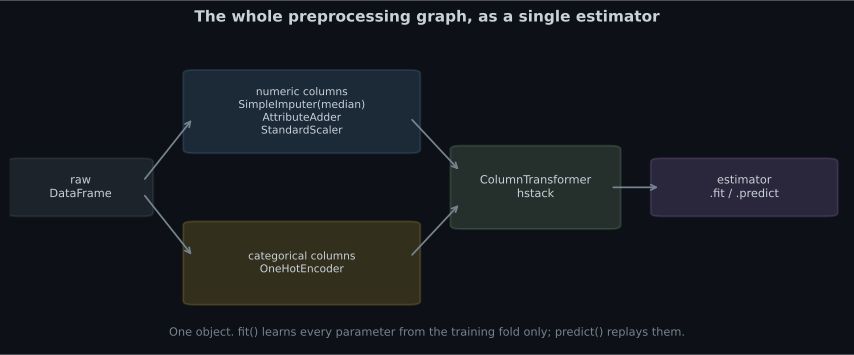
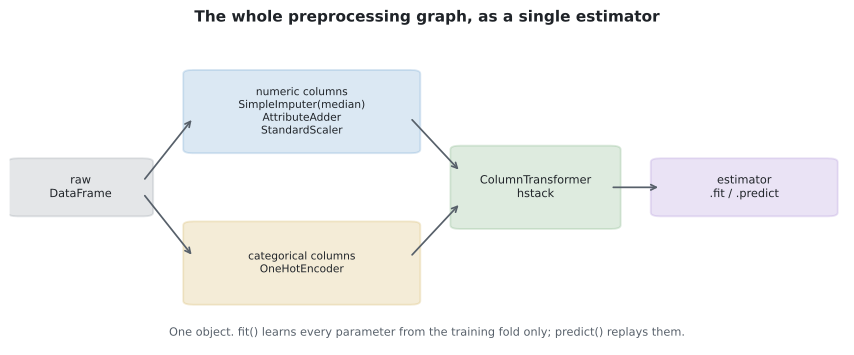
That is true and it undersells them. A pipeline is also one object with one flat namespace of hyperparameters, and that turns several separate problems into one:
- Tuning preprocessing and the model becomes a single search.
- Comparing model families becomes a single search.
- Shipping becomes a single file.
- Reproducing a result becomes one
set_paramscall.
The flat namespace
Section titled “The flat namespace”Every parameter of every step is reachable by a double-underscore path:
from sklearn.compose import ColumnTransformer
from sklearn.impute import SimpleImputer
from sklearn.pipeline import Pipeline
from sklearn.preprocessing import OneHotEncoder, StandardScaler
from sklearn.svm import SVC

pipe = Pipeline([
    ("pre", ColumnTransformer([
        ("num", Pipeline([("impute", SimpleImputer()), ("scale", StandardScaler())]),
         num_cols),
        ("cat", OneHotEncoder(handle_unknown="ignore"), cat_cols),
    ])),
    ("model", SVC()),
])

tunable = [k for k in pipe.get_params() if "__" in k]
print(len(tunable))                              # 40+ addressable parameters
print(pipe.get_params()["pre__num__impute__strategy"])   # 'mean'

pipe.set_params(pre__num__impute__strategy="median", model__C=10)
Read pre__num__impute__strategy right to left: the strategy of the step called impute, inside
the pipeline called num, inside the ColumnTransformer called pre. Arbitrary nesting, one flat
string.
Swapping whole models as a hyperparameter
Section titled “Swapping whole models as a hyperparameter”The step itself is a parameter, so a single search can compare model families and their hyperparameters, each family with the preprocessing it needs:
from sklearn.ensemble import RandomForestClassifier
from sklearn.linear_model import LogisticRegression
from sklearn.model_selection import GridSearchCV
from sklearn.pipeline import Pipeline
from sklearn.preprocessing import StandardScaler
from sklearn.svm import SVC

pipe = Pipeline([
    ("scale", StandardScaler()),
    ("model", LogisticRegression()),      # a placeholder; the search replaces it
])

param_grid = [
    {"model": [LogisticRegression(max_iter=5000)],
     "model__C": [0.1, 1, 10]},
    {"model": [SVC()],
     "model__C": [1, 10, 100],
     "model__gamma": [0.001, 0.01, 0.1]},
    {"model": [RandomForestClassifier(random_state=0)],
     "model__n_estimators": [100, 300],
     "model__max_depth": [5, 10, None],
     "scale": ["passthrough"]},           # trees do not need scaling
]

search = GridSearchCV(pipe, param_grid, cv=5, n_jobs=-1).fit(X, y)

print(type(search.best_estimator_.named_steps["model"]).__name__)
print(round(search.best_score_, 4))
Two things worth pausing on:
"scale": ["passthrough"]disables a step entirely. The forest branch skips scaling; the others keep it. Whether to scale at all becomes part of the search.- The comparison is fair. Every family is evaluated on identical folds with identical preprocessing rules, which a hand-written loop over models rarely manages.
Caching repeated work
Section titled “Caching repeated work”A grid over model__C refits the imputer and the scaler for every value of C, even though the
preprocessing does not depend on C at all. On a large ColumnTransformer that is most of the
runtime.
from shutil import rmtree
from tempfile import mkdtemp

cache_dir = mkdtemp()
pipe = Pipeline(steps, memory=cache_dir)      # memoise every fitted transformer

search = GridSearchCV(pipe, param_grid, cv=5, n_jobs=-1).fit(X, y)

rmtree(cache_dir)                             # clean up when finished
Each transformer is fitted once per unique (input, parameters) combination and reused. The saving scales with how much of your grid varies only the final estimator — often 2× to 5× on a realistic preprocessing stack.
See it move
Section titled “See it move”The sketch runs a 4 × 3 grid — four values of model__C crossed with three values of
pre__num__imputer__strategy — through five folds, twice. The upper run has no memory=; the lower
one caches. Each block lights amber when it is actually fitted and green when it is served from cache,
and the counters at the bottom tally transformer fits and simulated seconds.
The arithmetic the sketch is animating: 60 fits, and only 15 distinct (strategy, fold) preprocessing
jobs among them. Caching therefore does ms of work instead of
ms — a 2.50× speed-up, entirely because C is not part
of the cache key. The multiplier is set by how much of your grid varies only the estimator: four C
values give 4×-ish on the preprocessing portion, and the more expensive your ColumnTransformer is
relative to the model, the closer the overall saving gets to that.
Custom scorers
Section titled “Custom scorers”GridSearchCV optimises accuracy by default. Accuracy is very rarely what anyone is paying for.
from sklearn.metrics import confusion_matrix, fbeta_score, make_scorer

# 1. A metric you can name
f2 = make_scorer(fbeta_score, beta=2)          # recall matters twice as much

# 2. A metric denominated in money
def net_value(y_true, y_pred):
    """Each caught fraud saves 500; each false alarm costs 20 in review time."""
    tn, fp, fn, tp = confusion_matrix(y_true, y_pred).ravel()
    return 500 * tp - 20 * fp

value_scorer = make_scorer(net_value, greater_is_better=True)

search = GridSearchCV(pipe, param_grid, cv=5, scoring=value_scorer, n_jobs=-1)
The second scorer is the one worth internalising. The search now maximises expected pounds, and it will choose a different threshold and different hyperparameters from the one maximising accuracy — correctly, because those are different objectives.
Three details:
greater_is_better=Falseflips the sign for losses, which is why scikit-learn reportsneg_mean_squared_error.needs_proba=Truegives the scorer probabilities instead of labels, for metrics like ROC-AUC.- Passing a dict of scorers to
scoringrecords several at once;refit="name"then chooses which one selects the winner.
Reading a fitted pipeline
Section titled “Reading a fitted pipeline”best = search.best_estimator_
# Which steps ran
print(list(best.named_steps))
# What preprocessing learned
print(best.named_steps["pre"].named_transformers_["num"]
.named_steps["impute"].statistics_.round(2))
# The column names after transformation — needed for any importance plot
feature_names = best.named_steps["pre"].get_feature_names_out()
print(len(feature_names), feature_names[:4])
# The model's own view
importances = best.named_steps["model"].feature_importances_
for name, score in sorted(zip(feature_names, importances),
key=lambda pair: -pair[1])[:5]:
print(f"{name:<28} {score:.4f}")get_feature_names_out() is the one people miss. Without it you have an importance vector and no
idea which column each entry refers to, which makes the whole analysis unusable.
Reproducibility
Section titled “Reproducibility”A pipeline makes a result reproducible only if you pin everything that varies:
| Item | Why | How |
|---|---|---|
random_state on every stochastic step | Splitters, forests, SGD, randomised search | Set it explicitly, everywhere |
| The CV splitter object | cv=5 is not the same splitter as KFold(5, shuffle=True) | Construct it and reuse it |
| Library versions | Defaults change between releases | pip freeze > requirements.txt |
| The data snapshot | “The database” is not a version | Hash the file, or store the query and date |
| The full parameter dict | best_params_ alone omits the defaults | joblib.dump the whole estimator |
import json
import sklearn
import joblib
from sklearn.model_selection import StratifiedKFold

CV = StratifiedKFold(5, shuffle=True, random_state=42)     # one object, reused

search = GridSearchCV(pipe, param_grid, cv=CV, n_jobs=-1).fit(X, y)

joblib.dump(search.best_estimator_, "model_v1.joblib")

with open("model_v1.meta.json", "w") as handle:
    json.dump({
        "cv_score": round(search.best_score_, 6),
        "params": {k: str(v) for k, v in search.best_params_.items()},
        "sklearn_version": sklearn.__version__,
        "n_rows": int(len(y)),
        "cv": "StratifiedKFold(5, shuffle=True, random_state=42)",
}, handle, indent=2)The whole loop
Section titled “The whole loop”# 1. Split, before anything else
X_train, X_test, y_train, y_test = train_test_split(
X, y, test_size=0.2, random_state=42, stratify=y
)
# 2. One pipeline for preprocessing and model
pipe = Pipeline([("pre", preparation), ("model", SVC())], memory=cache_dir)
# 3. Search families and hyperparameters together
search = RandomizedSearchCV(
pipe, param_distributions, n_iter=60, cv=CV,
scoring=value_scorer, random_state=42, n_jobs=-1,
).fit(X_train, y_train)
# 4. Honest estimate of the tuning procedure, if you need to report one
nested = cross_val_score(search, X_train, y_train, cv=CV, n_jobs=-1)
# 5. Final check on the untouched test set — exactly once
final_score = value_scorer(search.best_estimator_, X_test, y_test)
# 6. Persist the estimator and its metadata together
joblib.dump(search.best_estimator_, "model_v1.joblib")Six steps, and every one of them has appeared in this phase. Step 2 is what makes 3, 4, 5 and 6 possible in a single line each.
Drawn as data flow, with the nesting made explicit:
  flowchart TD
  RAW["all labelled data"] --> SPLIT{{"train_test_split
stratify=y, random_state=42"}}
  SPLIT -->|"80%"| TR["X_train, y_train"]
  SPLIT -->|"20%"| TE["X_test -- sealed"]
  TR --> SEARCH["RandomizedSearchCV
n_iter=60, scoring=value_scorer"]
  SEARCH --> INNER["for each candidate:
5-fold CV over X_train"]
  INNER --> FIT["fit Pipeline(pre, model)
on 4 folds, score on the 5th"]
  FIT -->|"memory=cache_dir"| CACHE[("fitted transformers
reused across candidates")]
  CACHE --> FIT
  INNER --> BEST["best_params_ -> refit on all of X_train
= best_estimator_"]
  TR --> NESTED["cross_val_score(search, ...)
an outer loop around the whole search"]
  NESTED --> HONEST["honest estimate of the
tuning PROCEDURE, not of one model"]
  BEST --> ONCE["score on X_test -- once"]
  TE --> ONCE
  ONCE --> SHIP["joblib.dump(best_estimator_)
+ metadata"]
The two loops answer different questions, and confusing them is the classic reporting error.
search.best_score_ is the mean CV score of the winning candidate — optimistically biased, because
that candidate was chosen by those folds. The outer cross_val_score re-runs the entire search
inside each of its own folds, so nothing it scores was selected using the rows it scores. If you need
one number to publish, it comes from the outer loop or from the sealed test set, never from
best_score_.
Pitfalls
Section titled “Pitfalls”-
What does 'model': [LogisticRegression(), SVC()] inside a param_grid do?
A pipeline step is a parameter like any other. Combined with a list of grids, each family can also carry its own hyperparameters and its own preprocessing.
pch.quizShowAnswer
B — Treats the estimator itself as a hyperparameter, so one search compares whole model families on identical folds — A pipeline step is a parameter like any other. Combined with a list of grids, each family can also carry its own hyperparameters and its own preprocessing.
-
Why pass memory= to a Pipeline during a grid search?
A grid over model__C refits the imputer and scaler for every C by default. Memoisation reuses them, often saving most of the runtime on a heavy preprocessing stack.
pch.quizShowAnswer
B — To cache fitted transformers, so preprocessing is not needlessly refitted for every value of a parameter it does not depend on — A grid over model__C refits the imputer and scaler for every C by default. Memoisation reuses them, often saving most of the runtime on a heavy preprocessing stack.
-
Why write a custom scorer that returns pounds rather than accuracy?
500 per caught fraud against 20 per false alarm is a different objective from 'maximise correct predictions', and it will choose a different operating point.
pch.quizShowAnswer
B — Because the search optimises whatever you give it, and a metric denominated in money selects different hyperparameters from one denominated in correct predictions — 500 per caught fraud against 20 per false alarm is a different objective from 'maximise correct predictions', and it will choose a different operating point.
-
What does get_feature_names_out() on a fitted ColumnTransformer give you?
After one-hot encoding and feature engineering the matrix no longer matches the input columns. Without the output names an importance array is a list of numbers with no labels.
pch.quizShowAnswer
B — The names of the columns after transformation — including the generated one-hot columns — which is what makes an importance vector interpretable — After one-hot encoding and feature engineering the matrix no longer matches the input columns. Without the output names an importance array is a list of numbers with no labels.
🧪 Try It Yourself
Section titled “🧪 Try It Yourself”Exercise 1 – Explore the flat namespace
Section titled “Exercise 1 – Explore the flat namespace”Exercise 2 – Search across model families
Section titled “Exercise 2 – Search across model families”Exercise 3 – Write a scorer denominated in money
Section titled “Exercise 3 – Write a scorer denominated in money”Exercise 4 – Recover the transformed column names
Section titled “Exercise 4 – Recover the transformed column names”Exercise 5 – Save the model and its metadata together
Section titled “Exercise 5 – Save the model and its metadata together”- A pipeline is one object with one flat namespace, so preprocessing and model are tuned together.
- The estimator step is itself a searchable parameter — one search can compare whole families, each
with its own hyperparameters and its own
"passthrough"decisions. memory=memoises fitted transformers and often removes most of a grid search’s redundant work.make_scorerlets the search optimise the objective you actually have, including one denominated in money.get_feature_names_out()is what turns an importance vector back into something interpretable.- Reproducibility needs the seed, the splitter object, the library versions, the data snapshot and
the whole estimator — not just
best_params_.
Exercise 6 – Price the transformer cache
Section titled “Exercise 6 – Price the transformer cache”Phase 7 ends here. Continue to Phase 8 - Model Deployment (MLOps) — the pipeline you just saved has to run somewhere, answer requests, and be noticed when it starts to drift.
pch.coffeeTagline
pch.coffeeCtapch.feedbackHeading
pch.feedbackSubheading