
Deploying to Mobile & Edge with TensorFlow Lite
A trained Keras model is a training artefact. It carries the optimiser state, the full graph, and float32 weights, and it runs through a framework designed to process large batches efficiently. A phone needs the opposite of all of that: one sample at a time, minimal memory, no framework.
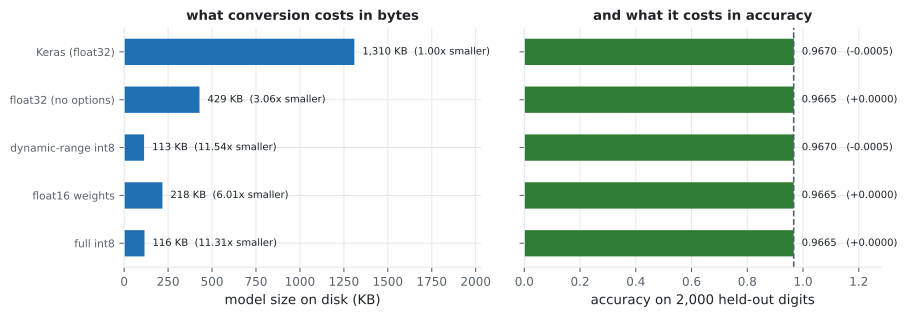
TensorFlow Lite converts between the two, and every claim it makes is checkable. Here is the same MNIST convnet — 108,618 parameters, 0.9650 validation accuracy — through four conversions, scored on 2,000 held-out digits:
| Conversion | Size | Shrink | Accuracy | Agreement with float | ms/sample |
|---|---|---|---|---|---|
Keras (.keras) | 1,309.6 KB | 1.00× | 0.9665 | 1.0000 | 1.627 |
| TFLite float32 | 428.6 KB | 3.06× | 0.9665 | 1.0000 | 0.033 |
| Dynamic-range int8 | 113.4 KB | 11.54× | 0.9670 | 0.9995 | 0.021 |
| Float16 weights | 217.7 KB | 6.01× | 0.9665 | 1.0000 | 0.033 |
| Full int8 | 115.8 KB | 11.31× | 0.9670 | 0.9980 | 0.031 |
Two numbers in that table are worth more than the rest. Conversion alone — with no quantisation at all — already shrank the model 3.06×. And single-sample latency dropped from 1.627 ms to 0.021 ms, a 77× speed-up, before any weights were touched.
What you’ll learn
Section titled “What you’ll learn”- What the converter strips out, and why that accounts for the first 3× on its own.
- The three quantisation modes, what each costs in accuracy, and which needs calibration data.
- Why agreement is a stricter check than accuracy, and what it caught here.
- Why the accuracy differences in that table should be read as noise, not as improvements.
Conversion, before any quantisation
Section titled “Conversion, before any quantisation”converter = tf.lite.TFLiteConverter.from_keras_model(model)
blob = converter.convert() # bytes, ready to ship
open("model.tflite", "wb").write(blob)That produced a 428.6 KB file from a 1,309.6 KB Keras one with identical predictions on all 2,000 test samples — agreement 1.0000. Nothing was approximated. The saving is everything a deployed model does not need: optimiser slots, training-only graph nodes, Python metadata, and the layer configuration needed to reconstruct the model for further training.
The latency result is the more surprising one. Keras took 1.627 ms per sample with batch_size=1;
the TFLite interpreter took 0.033 ms. That gap is not the model getting faster — it is
per-call framework overhead disappearing. Keras is built to amortise that cost across a batch, and
at batch size 1 there is nothing to amortise. On a device serving one user’s photo at a time, that
overhead is the inference cost.
  flowchart LR
  K["Keras model
1,309.6 KB"] -->|"convert"| F["TFLite float32
428.6 KB, identical outputs"]
  F -->|"Optimize.DEFAULT"| D["dynamic-range int8
113.4 KB"]
  F -->|"supported_types = float16"| H["float16
217.7 KB"]
  F -->|"+ representative_dataset"| I["full int8
115.8 KB"]
  D -.->|"agreement 0.9995"| A["1 prediction in 2,000 changed"]
  I -.->|"agreement 0.9980"| B["4 predictions in 2,000 changed"]
The three quantisation modes
Section titled “The three quantisation modes”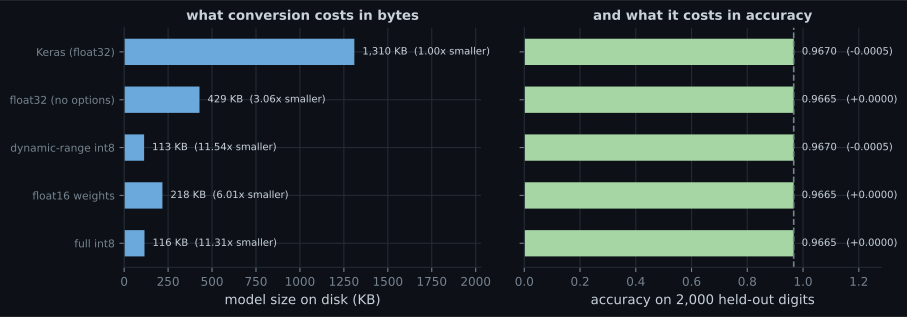
Dynamic-range quantisation stores weights as int8 and dequantises them at run time; activations stay float. One line, no data required, 11.54× smaller. It is the default recommendation and the measurements support that.
Float16 halves the weights rather than quartering them — 217.7 KB, 6.01× — and here changed nothing at all (agreement 1.0000). Its purpose is GPU deployment, where float16 is natively fast; on CPU it is strictly worse than int8 for size with no compensating speed.
Full int8 quantises activations too, which requires knowing their range. That is what the representative dataset provides:
def representative():
    for row in x_train[:200]:                  # a few hundred real samples
        yield [row[None, ...].astype("float32")]

converter.optimizations = [tf.lite.Optimize.DEFAULT]
converter.representative_dataset = representative
converter.target_spec.supported_ops = [tf.lite.OpsSet.TFLITE_BUILTINS_INT8]
converter.inference_input_type = tf.int8       # the model now takes int8 IN
converter.inference_output_type = tf.int8
Note that full int8 came out larger than dynamic-range (115.8 KB against 113.4 KB), which looks backwards. It is not: quantising activations means storing a scale and zero-point for every intermediate tensor, and those parameters cost more than the extra weight compression saves on a model this small. Its purpose is integer-only accelerators that cannot execute float operations at all — not size.
That last mode also changes the calling convention, which is easy to miss:
scale, zero_point = input_detail["quantization"]
row = np.round(image / scale + zero_point).astype(np.int8)
...
out_scale, out_zero = output_detail["quantization"]
result = (raw_output.astype("float32") - out_zero) * out_scale
Feed a float array to an int8 model and it will not error — it will reinterpret your data and return confident nonsense.
Latency
Section titled “Latency”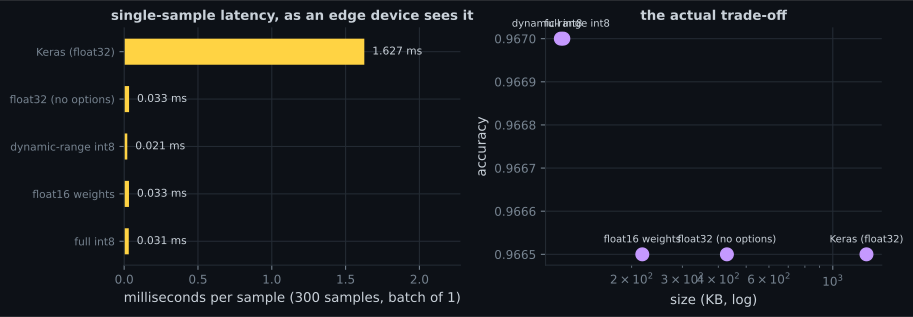
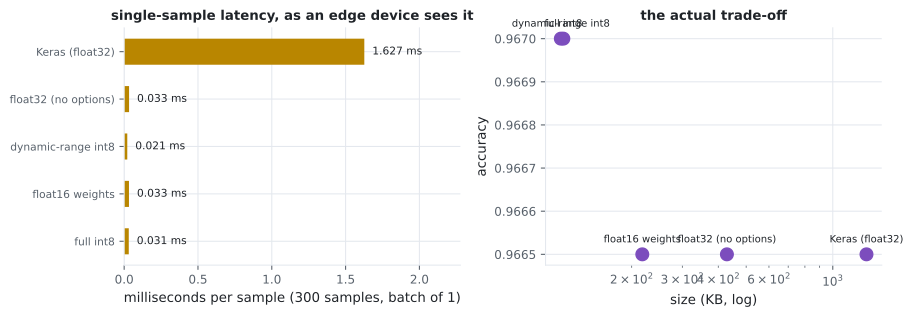
Dynamic-range int8 was fastest at 0.021 ms, but treat the ordering within TFLite cautiously — these are sub-millisecond measurements on a busy CPU, and the honest claim is that all four are roughly 50–77× faster than Keras at batch size 1, not that one is reliably 1.6× faster than another.
Agreement is stricter than accuracy
Section titled “Agreement is stricter than accuracy”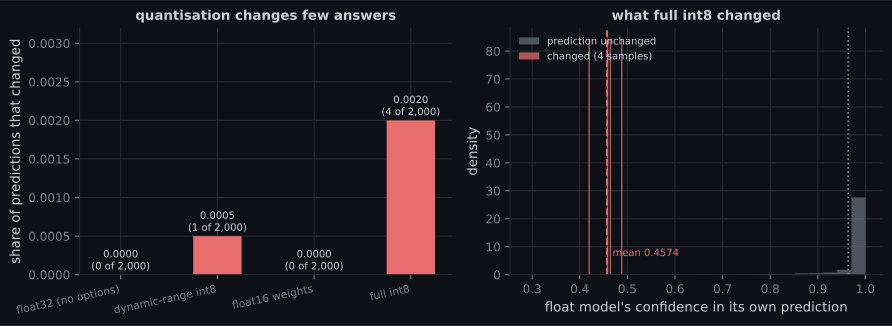
This distinction matters in practice. A conversion that keeps accuracy at 0.9665 while changing which 3.35% it gets wrong is a different model, and if anything downstream depends on specific predictions — a cached result, a regression test, a user-visible label — accuracy will not warn you. Comparing against the float model’s own outputs will.
The confidence histogram explains the mechanism: the samples whose prediction flipped are drawn from the low-confidence tail. Quantisation perturbs the logits slightly, and only decisions that were nearly ties can flip.
Pitfalls
Section titled “Pitfalls”- Reading small accuracy differences as improvements. The quantised models scored +0.0005, which is one extra correct answer out of 2,000.
- Feeding float data to a fully quantised model. It takes int8 in and returns int8 out; the scale and zero-point must be applied by the caller.
- Skipping the representative dataset for full int8. Without it the converter has no ranges for activations and the result is unusable.
- Expecting full int8 to be the smallest. It was larger than dynamic-range here (115.8 KB against 113.4 KB), because activation quantisation parameters cost space.
- Benchmarking the converted model with Keras. The 77× latency gap is mostly framework overhead at batch size 1; measure through the interpreter you will actually deploy.
- Comparing a
.kerasfile with a.tflitefile and crediting quantisation. Conversion alone accounted for 3.06× of the 11.54×. - Assuming float16 helps on CPU. It is a GPU optimisation; here it was 6.01× smaller against int8’s 11.54×, with no speed advantage.
- Conversion alone shrank the model 3.06× with identical predictions and made single-sample inference 49× faster.
- Dynamic-range int8 is one line, needs no data, and gave 11.54× at a cost of one changed prediction in 2,000.
- Float16 gives 6.01× and exists for GPU deployment; on CPU int8 dominates it.
- Full int8 needs a representative dataset, changes the input and output dtypes, and targets integer-only hardware rather than size — it was slightly larger here.
- Agreement with the float model (0.9980–1.0000) catches changes that accuracy hides.
- Predictions that changed were concentrated among samples the float model was already unsure about.
Quantisation shrinks a finished model. The other two compression families change the model itself, and both can be measured the same way: Model Compression: Pruning, Quantisation and Distillation.
-
Converting to TFLite with no quantisation options shrank the model from 1,309.6 KB to 428.6 KB with identical predictions. Where did the 3.06x go?
Agreement with the original was 1.0000 on all 2,000 samples, so nothing numerical was approximated.
pch.quizShowAnswer
B — Everything a deployed model does not need — optimiser state, training-only graph nodes, and the configuration required to rebuild the model for further training — Agreement with the original was 1.0000 on all 2,000 samples, so nothing numerical was approximated.
-
Keras took 1.627 ms per sample and the TFLite interpreter 0.033 ms for the same float32 computation. Why?
The two produce identical outputs, so the difference cannot be in the arithmetic being performed.
pch.quizShowAnswer
B — It is mostly per-call framework overhead, which Keras is designed to amortise across a batch — at batch size 1 there is nothing to amortise, and on a device serving one input at a time that overhead is the inference cost — The two produce identical outputs, so the difference cannot be in the arithmetic being performed.
-
Full int8 produced a LARGER file (115.8 KB) than dynamic-range int8 (113.4 KB). Is that a bug?
Full int8 exists for integer-only accelerators that cannot execute float operations, not primarily for size.
pch.quizShowAnswer
B — No — quantising activations as well as weights requires storing a scale and zero-point for every intermediate tensor, and on a small model those parameters outweigh the extra compression — Full int8 exists for integer-only accelerators that cannot execute float operations, not primarily for size.
-
Why compare a converted model's predictions against the float model's outputs rather than just checking accuracy?
Anything downstream that depends on specific predictions — cached results, regression tests — will not be protected by an unchanged accuracy figure.
pch.quizShowAnswer
B — Because a conversion can hold accuracy constant while changing WHICH samples it gets right — full int8 changed 4 of 2,000 predictions while its accuracy rose slightly, since some changes were corrections — Anything downstream that depends on specific predictions — cached results, regression tests — will not be protected by an unchanged accuracy figure.
-
The samples whose predictions changed under quantisation had noticeably lower float-model confidence. Why is that expected?
It also means the risk of quantisation is concentrated exactly where the model was already unreliable.
pch.quizShowAnswer
B — Quantisation perturbs the logits slightly, so only decisions that were already near-ties can flip; a confident prediction has too large a margin to be changed by rounding the weights — It also means the risk of quantisation is concentrated exactly where the model was already unreliable.
🧪 Try It Yourself
Section titled “🧪 Try It Yourself”pch.coffeeTagline
pch.coffeeCtapch.feedbackHeading
pch.feedbackSubheading