
Saving and Loading Models (Pickle, Joblib)
What you’ll learn
Section titled “What you’ll learn”- why you save the whole
Pipeline, measured: forgetting the scaler costs 0.5848 silently - pickle against joblib, and what the difference actually is
compress=3at 5.33× smaller, and why level 9 is rarely worth it- the provenance file that has to sit beside every artefact
- why loading a pickle is equivalent to running arbitrary code
The failure that raises no error
Section titled “The failure that raises no error”Start here, because it is the mistake that survives code review.
You train a scaler and a classifier. You save the classifier. In production you load it, feed it raw input, and it returns predictions — correctly typed, correctly shaped, no warning, no exception.
They are garbage.
| What was saved | What was fed to predict | Test accuracy |
|---|---|---|
The whole Pipeline | raw X_test | 0.9591 |
| Only the estimator | correctly scaled X_test | 0.9591 |
| Only the estimator | raw X_test — the bug | 0.3743 |
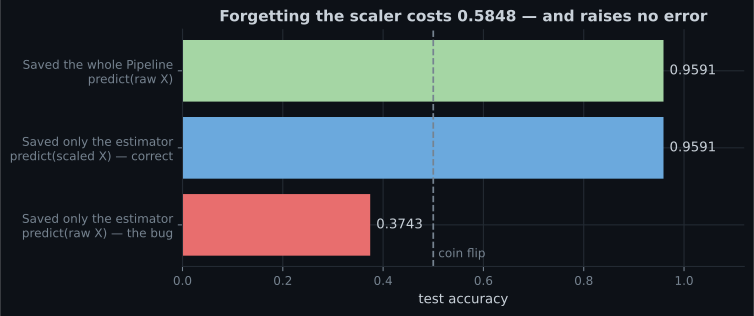
Accuracy fell from 0.9591 to 0.3743 — below the 0.5 you would get from a coin. The model is receiving features whose means are in the hundreds where it expects values near zero, and it responds with confident nonsense.
Save the whole pipeline. Not the estimator, not the estimator plus a note about the scaler — the
fitted Pipeline object, which carries its preprocessing with it.
import joblib
from sklearn.linear_model import LogisticRegression
from sklearn.pipeline import make_pipeline
from sklearn.preprocessing import StandardScaler

# YES — one object, one artefact, no way to use it wrongly.
pipe = make_pipeline(StandardScaler(), LogisticRegression(max_iter=5000))
pipe.fit(X_train, y_train)
joblib.dump(pipe, "model.joblib")

# NO — two objects, and the second one is easy to forget.
scaler = StandardScaler().fit(X_train)
model = LogisticRegression(max_iter=5000).fit(scaler.transform(X_train), y_train)
joblib.dump(model, "model.joblib")     # where did the scaler go?
The pipeline version is also unusable incorrectly: pipe.predict(X) takes raw features by
construction, so there is no wrong way to call it.
  flowchart TD
  subgraph GOOD["Save the Pipeline"]
    A1["raw X"] --> A2["StandardScaler
(inside the artefact)"]
    A2 --> A3["LogisticRegression"]
    A3 --> A4["0.9591"]
  end
  subgraph BAD["Save only the estimator"]
    B1["raw X"] --> B3["LogisticRegression
expects scaled input"]
    B3 --> B4["0.3743 — and no error"]
  end
See it move
Section titled “See it move”The amber line is the model. It was fitted in standardised space and it stays there. When raw features arrive, the points are simply somewhere else entirely — and the model still returns a label for every one of them.
pickle or joblib
Section titled “pickle or joblib”Both serialise a Python object graph. joblib is a wrapper around pickle with special handling for large NumPy arrays.
The conventional advice is “use joblib for scikit-learn, it is faster and smaller”. The measured sizes on disk:
| Model | pickle | joblib (default) |
|---|---|---|
| Logistic pipeline | 2.0 KB | 2.3 KB |
| 15-NN pipeline | 98.1 KB | 98.4 KB |
| Gradient boosting | 249.3 KB | 256.5 KB |
| Random forest, 500 trees | 1,268.3 KB | 1,307.4 KB |
joblib’s default output is slightly larger in every case. On load times this machine was too
busy to give a number worth printing, but the direction was consistent: plain pickle.load was not
slower, and on the forest it was substantially faster.
So the folklore is not what it once was. What joblib genuinely gives you:
Built-in compression. One keyword, and it matters (below).
Memory-mapping. joblib.load(path, mmap_mode="r") maps large arrays from disk instead of
copying them into memory. With several worker processes serving the same model, they share one copy
of the pages instead of each holding their own — that is a real memory win, and pickle has no
equivalent.
A stable, documented API for exactly this job. It is what scikit-learn’s own documentation uses.
Use joblib. Use it because of compression and memmap, not because of a speed claim you have not measured.
Compression
Section titled “Compression”The forest artefact is 1.3 MB uncompressed. Trees are enormously repetitive, so they compress well:
compress | Size | Ratio |
|---|---|---|
| 0 (default) | 1,307.4 KB | 1.00× |
| 1 | 294.0 KB | 4.45× |
| 3 | 245.3 KB | 5.33× |
| 6 | 229.2 KB | 5.70× |
| 9 | 217.4 KB | 6.01× |
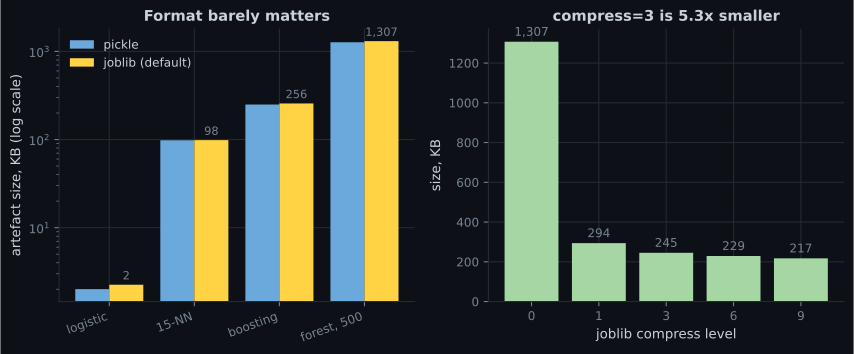
Use compress=3. Level 1 gets you 74% of the benefit for the least CPU; level 3 gets 89%;
level 9 spends a lot more time for the last 11%. In a container image or an S3 object, going from
1.3 MB to 245 KB is worth one keyword.
joblib.dump(pipe, "model.joblib", compress=3)Versioning artefacts
Section titled “Versioning artefacts”Overwriting model.joblib on every train is how you end up unable to roll back. Name the file so
that a rollback is a path change.
import hashlib
import json
import platform
from pathlib import Path

import joblib
import sklearn


def save_model(pipe, out_dir, version, data_snapshot, metrics, seed):
    """Write the artefact plus everything needed to explain it later."""
    out = Path(out_dir)
    out.mkdir(parents=True, exist_ok=True)

    model_path = out / f"model-{version}.joblib"
    joblib.dump(pipe, model_path, compress=3)

    digest = hashlib.sha256(model_path.read_bytes()).hexdigest()[:16]
    meta = {
        "version": version,
        "sha256_16": digest,
        "python": platform.python_version(),
        "sklearn": sklearn.__version__,
        "estimator": type(pipe[-1]).__name__ if hasattr(pipe, "__getitem__")
                     else type(pipe).__name__,
        "steps": [name for name, _ in getattr(pipe, "steps", [])],
        "data_snapshot": data_snapshot,
        "random_state": seed,
        "metrics": metrics,
        "size_kb": round(model_path.stat().st_size / 1024, 1),
    }
    (out / f"model-{version}.meta.json").write_text(json.dumps(meta, indent=2))
    return model_path, meta
A latest symlink (or a small pointer file) lets serving code stay unaware of version numbers while
rollback stays a one-line change.
  flowchart LR
  T["Train"] --> S["Save
model-2026-08-03.joblib"]
  T --> M["Write
model-2026-08-03.meta.json"]
  S --> P["Repoint 'latest'"]
  M --> P
  P --> L["Serving loads 'latest'"]
  L --> V{"Version matches
the metadata?"}
  V -->|"no"| X["RAISE — refuse to start"]
  V -->|"yes"| R["Serve"]
  R -->|"bad release"| B["Repoint 'latest'
at yesterday"]
  B --> L
| File | Why it exists |
|---|---|
model-2026-08-03.joblib | The artefact itself, immutable once written |
model-2026-08-03.meta.json | Versions, seed, data snapshot, metrics, hash |
latest → the current one | What serving loads, so rollback is a repoint |
The metadata is not bureaucracy. In six months, “which data produced this and what did it score?” is a question you will be asked, and the artefact alone cannot answer it.
The version-mismatch problem
Section titled “The version-mismatch problem”A pickle stores references to classes by import path, not the class definitions. Load it in an environment whose scikit-learn has moved those internals and you get one of three outcomes:
- It loads and behaves identically. Most common, and you learn nothing.
- It loads with
InconsistentVersionWarningand predicts slightly differently. - It raises — a missing attribute or a changed
__reduce__.
Outcome 2 is the dangerous one, because it is silent unless you are watching for the warning.
import json
import warnings
from pathlib import Path

import joblib
import sklearn
from sklearn.exceptions import InconsistentVersionWarning


def load_checked(model_path, meta_path):
    """Load an artefact and refuse to continue quietly on a version mismatch."""
    meta = json.loads(Path(meta_path).read_text())
    if meta["sklearn"] != sklearn.__version__:
        raise RuntimeError(
            f"model was trained on sklearn {meta['sklearn']}, "
            f"this environment has {sklearn.__version__}"
        )
    with warnings.catch_warnings():
        warnings.simplefilter("error", InconsistentVersionWarning)
        return joblib.load(model_path)
Raising is the right default for serving. A prediction API that quietly starts producing different numbers after a dependency bump is much worse than one that refuses to start.
Security
Section titled “Security”Unpickling is arbitrary code execution. A pickle stream is a small program for a virtual
machine that can import modules and call functions. A malicious .joblib file can run anything the
serving process can run.
# Never do this with a file you did not produce.
model = joblib.load(request.files["model"])
Rules:
- Load only artefacts your own pipeline wrote, from storage only you can write to.
- Never accept a model file over the network or from a user upload.
- Verify a checksum before loading if the artefact crossed a trust boundary.
- For genuinely untrusted models, use a format that is not executable —
skopscan persist most scikit-learn estimators without arbitrary code execution, and ONNX exports the computation graph rather than Python objects.
| Format | Executes code on load | Cross-language | Cross-version | Typical use |
|---|---|---|---|---|
| pickle / joblib | yes | no | fragile | Internal artefacts you produced |
| skops | no | no | better | Sharing sklearn models externally |
| ONNX | no | yes | stable | Serving from C++, Rust, JS, mobile |
| PMML | no | yes | stable | Legacy enterprise scoring engines |
In code
Section titled “In code”The whole round trip:
import joblib
import numpy as np
from sklearn.datasets import load_breast_cancer
from sklearn.linear_model import LogisticRegression
from sklearn.model_selection import train_test_split
from sklearn.pipeline import make_pipeline
from sklearn.preprocessing import StandardScaler

X, y = load_breast_cancer(return_X_y=True)
X_tr, X_te, y_tr, y_te = train_test_split(X, y, test_size=0.3,
                                          random_state=0, stratify=y)

pipe = make_pipeline(StandardScaler(), LogisticRegression(max_iter=5000))
pipe.fit(X_tr, y_tr)
print("before saving:", round(pipe.score(X_te, y_te), 4))     # 0.9591

joblib.dump(pipe, "model.joblib", compress=3)
reloaded = joblib.load("model.joblib")

print("after loading:", round(reloaded.score(X_te, y_te), 4))  # 0.9591

# The check that belongs in every deployment script.
assert np.array_equal(pipe.predict(X_te), reloaded.predict(X_te)), \
    "reloaded model does not reproduce the original predictions"
That assertion costs microseconds and catches version mismatches, truncated uploads and wrong-file-loaded bugs before they reach a user.
Pitfalls
Section titled “Pitfalls”Saving the estimator without its preprocessing. Measured: 0.9591 → 0.3743, silently. Save the
Pipeline.
Overwriting one filename every time you train. Rollback becomes “retrain and hope”. Version the filename.
Storing the artefact without its metadata. Six months later nobody knows which data, which seed, or which library versions produced it.
Assuming joblib is faster than pickle. The measured sizes here favour pickle slightly and the load times did not favour joblib. Use joblib for compression and memmap, not for a speed claim.
Suppressing InconsistentVersionWarning. It is the only signal that the artefact and the
environment disagree.
Loading a pickle you did not create. It is remote code execution with extra steps.
Forgetting that the artefact contains the training data for instance-based models. A pickled
k-NN is a data export — 98.1 KB here, but on a real dataset it is your customer table with a
.joblib extension.
- Save the whole
Pipeline. Saving the bare estimator and feeding it raw input cost 0.5848 accuracy with no error raised. - pickle and joblib produce near-identical sizes (2.0 vs 2.3 KB; 1,268 vs 1,307 KB). Choose joblib
for
compress=andmmap_mode=, not for speed. compress=3took the forest from 1,307.4 KB to 245.3 KB, 5.33× smaller. Level 9 buys 11% more for a lot more CPU.- Version the filename, and write a
.meta.jsonbeside it with versions, seed, data snapshot and metrics. - A version mismatch should raise, not warn, in a serving path.
- Unpickling runs arbitrary code. Load only artefacts you produced.
-
You saved only the fitted LogisticRegression, not the StandardScaler, and serve it raw features. What happens?
The estimator has no idea its inputs were meant to be standardised. It gets values in the hundreds where it expects values near zero and produces well-formed nonsense. Nothing in the code path can detect this, which is exactly why you save the Pipeline.
pch.quizShowAnswer
B — It returns confidently wrong predictions — measured at 0.3743 accuracy, worse than a coin flip — The estimator has no idea its inputs were meant to be standardised. It gets values in the hundreds where it expects values near zero and produces well-formed nonsense. Nothing in the code path can detect this, which is exactly why you save the Pipeline.
-
What does joblib actually give you over plain pickle for scikit-learn models?
Measured sizes were within a few percent, and joblib's default output was slightly larger every time. The real advantages are compress= and mmap_mode=, the latter letting several worker processes share one copy of a large array.
pch.quizShowAnswer
B — Built-in compression and memory-mapping of large arrays across processes — Measured sizes were within a few percent, and joblib's default output was slightly larger every time. The real advantages are compress= and mmap_mode=, the latter letting several worker processes share one copy of a large array.
-
joblib compress=3 took a 1,307 KB forest to 245 KB. Why not use compress=9?
The compression curve flattens fast: level 1 already gets 4.45x of the available 6.01x. Past level 3 you are paying real CPU for single-digit percentage gains, on every single save.
pch.quizShowAnswer
B — It reaches 217 KB — only 11% smaller than level 3 — for substantially more CPU on every save — The compression curve flattens fast: level 1 already gets 4.45x of the available 6.01x. Past level 3 you are paying real CPU for single-digit percentage gains, on every single save.
-
Your serving code loads a model trained under a different scikit-learn version. What should it do?
The dangerous outcome is not a crash, it is loading successfully and predicting slightly differently. A failed deploy is visible and revertible; a subtly changed model is neither.
pch.quizShowAnswer
B — Raise and refuse to start — silent behaviour changes in production are worse than a failed deploy — The dangerous outcome is not a crash, it is loading successfully and predicting slightly differently. A failed deploy is visible and revertible; a subtly changed model is neither.
-
A user uploads a .joblib file to your web app so you can score it for them. What is the risk?
A pickle stream is a program, not just data — it can import modules and call functions during load. Never unpickle a file from outside your trust boundary. Use skops or ONNX if you genuinely must accept external models.
pch.quizShowAnswer
B — Unpickling executes arbitrary code, so loading it runs whatever the uploader wants as your server process — A pickle stream is a program, not just data — it can import modules and call functions during load. Never unpickle a file from outside your trust boundary. Use skops or ONNX if you genuinely must accept external models.
🧪 Try It Yourself
Section titled “🧪 Try It Yourself”Exercise 1 – Reproduce the silent failure
Section titled “Exercise 1 – Reproduce the silent failure”Exercise 2 – Round-trip with an assertion
Section titled “Exercise 2 – Round-trip with an assertion”Exercise 3 – Measure the compression curve
Section titled “Exercise 3 – Measure the compression curve”Exercise 4 – Build a versioned filename and metadata
Section titled “Exercise 4 – Build a versioned filename and metadata”Exercise 5 – Refuse to load across versions
Section titled “Exercise 5 – Refuse to load across versions”Exercise 6 – What the metadata costs, and what it saves
Section titled “Exercise 6 – What the metadata costs, and what it saves”Building an ML API with Flask/FastAPI — putting the artefact behind HTTP, the one thing that must never be in the request path, and why batching is nearly free throughput.
pch.coffeeTagline
pch.coffeeCtapch.feedbackHeading
pch.feedbackSubheading